

SPF misconfigurations flagged by Gmail
Email providers like Gmail rely heavily on SPF to verify whether a message is sent from an authorized source. When SPF is misconfigured, even legitimate emails can fail authentication, land in spam folders, or break DMARC enforcement. Many of these issues are not caused by missing SPF records but by small configuration mistakes, such as excessive DNS lookups, duplicate records, incorrect mechanisms, or improperly authorized third-party senders.
Because modern email environments involve multiple platforms and cloud services, these errors are more common than many organizations realize. Understanding the most frequent SPF misconfigurations flagged by Gmail can help you quickly identify problems, improve deliverability, and protect your domain from spoofing attempts.
So, here is a list of common errors and ways to fix or avoid them.
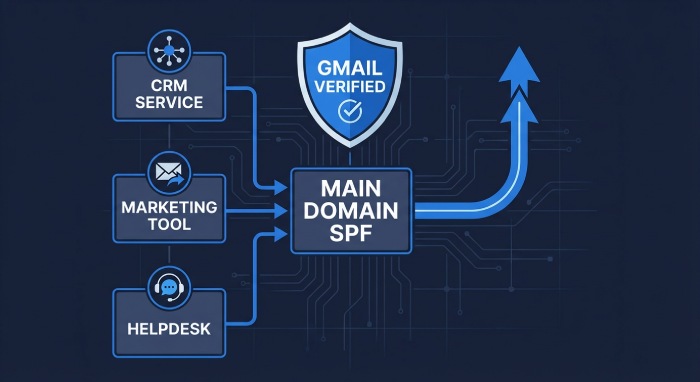
Exceeding the DNS lookup limit
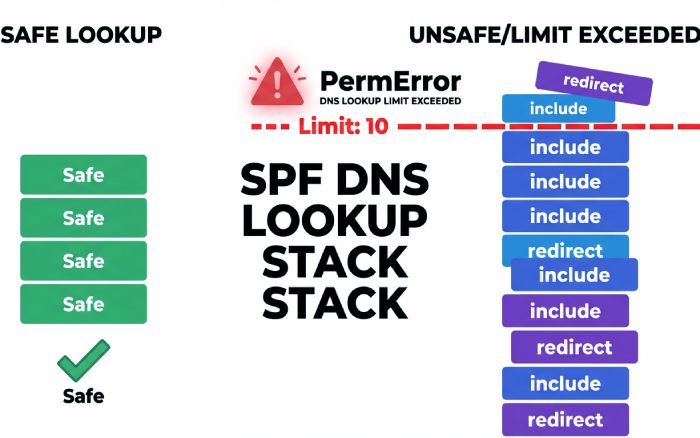
One of the most common SPF issues flagged by Gmail is exceeding the 10 DNS lookup limit allowed during SPF evaluation. SPF records rely on mechanisms such as include, a, mx, ptr, exists, and redirect, each of which can trigger additional DNS queries. When the total number of lookups crosses ten, Gmail stops the evaluation and returns “spf=permerror (too many DNS lookups)”, which can increase spam filtering risk and potentially cause DMARC failures if DKIM is not aligned.
This problem usually occurs when organizations stack multiple email service providers’ (ESPs) ‘include’ entries, use a or mx mechanisms tied to hosts with many records, or unintentionally redirect SPF to another record containing several nested includes. To prevent lookup failures, businesses should simplify SPF structures by flattening records, replacing includes with direct ip4 or ip6 entries where possible, and separating different sending streams (such as marketing and transactional email) into dedicated subdomains with independent SPF records.
Existence of multiple SPF records for a domain
Another SPF misconfiguration frequently flagged by Gmail is the presence of multiple SPF records for the same domain. SPF standards allow only one TXT record beginning with v=spf1 per domain or hostname. When Gmail detects more than one SPF entry, whether different records or accidental duplicates, it treats the configuration as invalid and returns “spf=permerror” (or sometimes “spf=none”), even if the listed sending IP addresses are correct.
This issue often happens when different teams independently add SPF records for separate email services, or when administrators mistakenly publish a new record instead of updating the existing one. The correct approach is to merge all authorized sending sources into a single SPF record, combining include, ip4, ip6, and other mechanisms into one consolidated line. If multiple services must be managed separately, organizations can use subdomains or the redirect mechanism rather than creating additional SPF records, ensuring Gmail can evaluate SPF successfully.
Misusing include, a, mx, and ptr leads to accidental fails
Incorrect use of SPF mechanisms such as include, a, mx, and ptr is another configuration issue that Gmail frequently flags. Each of these mechanisms expands the list of authorized senders differently, and using them without understanding their behavior can unintentionally allow unauthorized systems or trigger SPF failures.
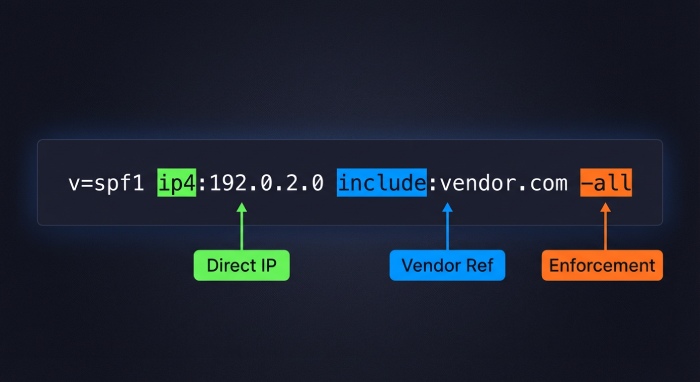
The include mechanism should always reference the exact hostname published by the email provider (for example, include:spf.sendgrid.net) rather than the provider’s root domain. Stacking multiple includes unnecessarily can also increase DNS lookups and create evaluation errors.
The ‘a’ mechanism authorizes the IP addresses tied to your domain’s A or AAAA records, which may accidentally permit web hosting servers to send mail if not intended. Similarly, ‘mx’ authorizes your inbound mail servers, which is useful only if those same systems also send outbound mail, which is uncommon in modern cloud setups. The ptr mechanism is deprecated and unreliable, so it should generally be avoided in enterprise SPF configurations.
So, it’s recommended to use only the mechanisms that reflect your real sending infrastructure, remove unnecessary a, mx, and ptr entries, and rely on provider-published include records or specific ip4/ip6 entries for accurate authorization.
Choosing ~all vs -all vs?all
The qualifier used at the end of your SPF record plays a direct role in how Gmail interprets authentication failures and assigns spam risk. The ~all (softfail) setting tells receivers that messages from non-authorized sources should be treated as suspicious but not immediately blocked, making it useful during SPF rollout or troubleshooting.
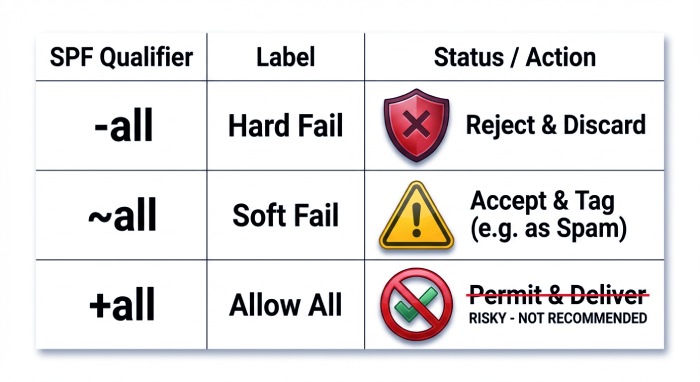
The -all (fail) setting is stricter and indicates that any sender not explicitly listed is unauthorized, which can significantly increase spam filtering or lead to DMARC quarantine or rejection if DKIM is misconfigured. The ?all (neutral) qualifier provides no enforcement signal and is rarely appropriate for production environments, while +all should never be used because it effectively authorizes every sending source and invites abuse.
The best approach is to start with ~all while monitoring authentication results via DMARC reporting, correct any missing senders, and then move to -all once legitimate traffic consistently passes SPF or DKIM alignment.
Third parties, forwarding, and intermediaries
SPF failures often appear when organizations rely on third-party email platforms, forwarding services, or intermediaries that send messages on their behalf. A common issue occurs when a new ESP, CRM, or SaaS platform is onboarded, but its authorized sending sources are not added to the domain’s SPF record, leading Gmail to return “spf=fail” for those messages. Even when SPF technically passes, DMARC can still fail if the Return-Path (bounce) domain is not aligned with the visible From domain, which is common with third-party senders.
To prevent these problems, organizations should follow a structured authorization process. Always verify the vendor’s official SPF hostname and add the correct ‘include’ entry (or use SPF-flattening tools where appropriate) instead of manually copying IPs from unofficial sources.
Whenever possible, enable DKIM signing using your own domain or configure a custom bounce/Return-Path domain to maintain DMARC alignment. For large-scale marketing or automated emails, using dedicated subdomains such as mail.example.com with separate SPF and DMARC policies helps isolate traffic and simplifies long-term authentication management.
Final words
By maintaining a single consolidated SPF record, authorizing only legitimate senders, aligning authentication with DMARC, and gradually moving toward stronger enforcement policies, organizations can significantly reduce authentication errors flagged by Gmail. Regular monitoring of DMARC reports and periodic SPF audits ensures that new services, vendors, or infrastructure changes do not introduce hidden failures, helping your domain maintain consistent email trust and inbox placement over time. Check out the DuoCircle for gaining further insight.