

Selecting the appropriate hosted SMTP server in 2026 is crucial for getting your emails delivered to the inbox rather than the spam folder. As authentication requirements become more stringent, sender reputation systems change, and competition for visibility intensifies, companies require dependable SMTP services that focus on deliverability, security, and scalability.
This guide features a selection of the 12 top hosted SMTP servers optimized for high deliverability in 2026. Whether you’re dispatching transactional messages, marketing campaigns, or important notifications, these platforms enhance inbox placement and streamline the management of your email infrastructure.
How we selected top hosted SMTP options
Choosing a hosted smtp server in 2026 means balancing cost, control, and email deliverability at scale. We ran an smtp comparison using deliverability tools, inbox placement tests, smtp test frameworks, and real-world email sending workloads to evaluate smtp server stability, email throughput, and event visibility. We also factored in smtp authentication defaults, DMARC alignment, and anti-abuse controls surfaced by each smtp service. Benchmarks included Side-by-Side Comparison resources from EmailToolTester, public email deliverability study data where available, and hands-on api integration checks.
This list focuses on providers that handle transactional emails and bulk email with consistent inboxing, strong smtp relay uptime, and analytics suitable for email marketing teams and developers. If you’re weighing free smtp servers, open source smtp, or a self-hosted smtp stack against a cloud smtp email provider, use this as a practical guide to decide when to choose email platform infrastructure vs. roll your own.
SMTP Server #1 — Amazon SES (AWS): Best for cost-efficient scale
Why it stands out
Amazon SES is the archetype of a cost-effective hosted smtp server and cloud smtp backbone. As an smtp service, SES is engineered for massive email throughput while preserving email deliverability through first-party controls. It’s a fit for SaaS, platforms, and developers who need elastic smtp relay for outgoing email and programmatic email campaigns integrated with AWS.
Deliverability highlights
- Dedicated IPs with automatic warmup and a robust Reputation Dashboard support consistent inboxing and email reputation.
- Configuration sets and event destinations expose granular email analytics and feedback loops, aiding email deliverability best practices.
- Strong defaults for smtp authentication (SPF/DKIM) and guidance for DMARC alignment reduce risk across transactional emails and bulk email.
Practical notes
- Ideal for api integration via AWS SDKs; integrates cleanly with CRM and product events.
- Setup can be steeper: governance, sandbox to production moves, smtp configuration, and smtp credentials management may require AWS fluency.
- Watch smtp pricing details (dedicated IPs, regions), and set clear email limit guardrails.
As a primary email provider, SES pairs well with external newsletter platforms and CRMs (HubSpot, Pipedrive, EngageBay, Flodesk) that need a separate transactional email service stream.
SMTP Server #2 — Twilio SendGrid: Best all-rounder tooling
Why it stands out
Twilio SendGrid blends developer-grade smtp server reliability with marketer-friendly tooling. As a mature hosted smtp server, it offers clear pathways from MVP to enterprise-scale email marketing, making it one of the most broadly adopted smtp providers.
a. Deliverability and tooling
- Expert Services, proactive IP warmup, suppression management, and event webhooks reinforce email deliverability for both transactional emails and bulk email.
- Powerful templates, A/B test support for email subject lines, and modular design systems suit email automation and newsletter signup flows.
- Strong SDKs and api integration reduce friction for smtp relay, smtp authentication, and smtp integration with apps and email clients.
b. Practical notes
- Plan complexity can grow at scale; run a pricing comparison and Cost Calculator exercise to forecast spend.
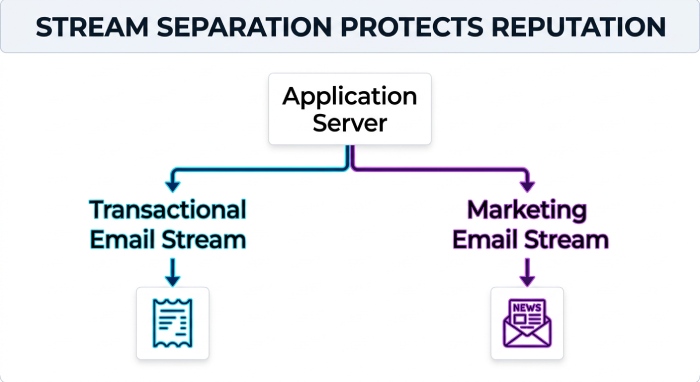
- Consider stream separation (marketing vs. transactional) for optimal email reputation and outgoing email control.
SendGrid works smoothly alongside email marketing services like Mailchimp or Brevo while powering receipts, alerts, and password resets via smtp port connections and authenticated smtp credentials.
SMTP Server #3 — Mailgun by Sinch: Developer-centric precision
Why it stands out
Mailgun is purpose-built for developers who need clarity in logs, precise routing, and top-tier validation. As an smtp service and transactional email service, it’s frequently selected for product-triggered email sending where email deliverability and visibility are paramount.
a. Deliverability and developer features
- Managed deliverability services, inbox placement tests, and fine-grained routing improve inbox rates across transactional emails and event-driven bulk email.
- Rich logs, EU/US regions, and robust APIs streamline troubleshooting, smtp configuration, and smtp tutorial onboarding.
- Built-in email verification reduces bounces, enhances email reputation, and protects your sender domain health.
b. Practical notes
- Add-ons (validation, dedicated IPs, advanced analytics) can raise total cost; evaluate smtp pricing against volume and email list management needs.
- Excellent fit for cloud smtp and microservices; pairs with newsletter software when you choose email platform separation between newsletters and system notifications.
SMTP Server #4 — Postmark (ActiveCampaign): Transactional-first and fast
Why it stands out
Postmark, now part of ActiveCampaign, is laser-focused on transactional emails and speed. It’s a hosted smtp server that enforces stream separation—keeping transactional traffic distinct from broadcast—which is a cornerstone of email deliverability best practices.
a. Deliverability and clarity
- Stable IPs, tight anti-abuse, and stream separation safeguard mission-critical receipts, OTPs, and lifecycle messages.
- Crystal-clear logs and webhooks elevate debugging, email analytics, and smtp integration quality for engineering teams.
- Emphasis on reliable smtp relay for outgoing email that must arrive in seconds.
b. Practical notes
- Not designed for bulk email marketing; use an ESP such as Mailchimp, Brevo, or Klaviyo for newsletters, email outreach, and marketing automation while Postmark handles system mail.
- Clean, opinionated approach suits teams that value simplicity over an all-in-one email marketing software stack.
SMTP Server #5 — SparkPost by MessageBird: Analytics-driven at scale
Why it stands out
SparkPost is the analytics powerhouse among smtp providers, making it a strong hosted smtp server for enterprises and data-driven teams. Its Signals intelligence and Adaptive Delivery continuously tune performance to maximize inboxing.
a. Deliverability and intelligence
- Advanced Deliverability Tools, predictive insights, and real-time reputation tuning support superior email deliverability across large-scale email campaigns.
- Enterprise SLAs, granular webhooks, and policy controls enhance governance for outgoing email, smtp authentication, and compliance.
- Excellent for bulk email where nuanced throttling, IP/Domain reputation controls, and dynamic smtp configuration matter.
b. Practical notes
- Steeper learning curve for smaller teams; consider onboarding support and an email marketing guide to fully leverage features.
- Validate costs via a pricing comparison and forecast models if you send across multiple regions.
SMTP Server #6 — Mailjet by Sinch: EU-first compliance and collaboration
Why it stands out
Mailjet brings GDPR-first sensibilities to a cloud smtp offering that unifies marketing and transactional email. It’s a hosted smtp server with collaborative editing, making it attractive to teams that want design and deliverability under one roof.
a. Deliverability and collaboration
- Dedicated/shared IP pools, warmup routines, ISP feedback loops, and region-aware routing support stable email deliverability.
- Team-friendly editor, email templates, and approval workflows streamline newsletter creation and email automation.
- Combines marketing and transactional emails without forcing a separate ESP, though you can still integrate with CRMs and newsletter platforms.
b. Practical notes
- Dev-heavy features are lighter than SendGrid or Mailgun; conduct an smtp comparison if you need deep observability or niche smtp test tooling.
- Mind your email limit and smtp pricing tiers as marketing volume grows, especially if exploring free email marketing or cheap email marketing promotions.
Where free SMTP, open source, and ESPs fit
Making sense of alternatives
- Free smtp servers and free email service options (e.g., personal Gmail) are not designed for production smtp relay or bulk email. You’ll hit restrictive email limit thresholds, weak sender controls, and inconsistent email deliverability. Use them only for staging or an smtp tutorial.
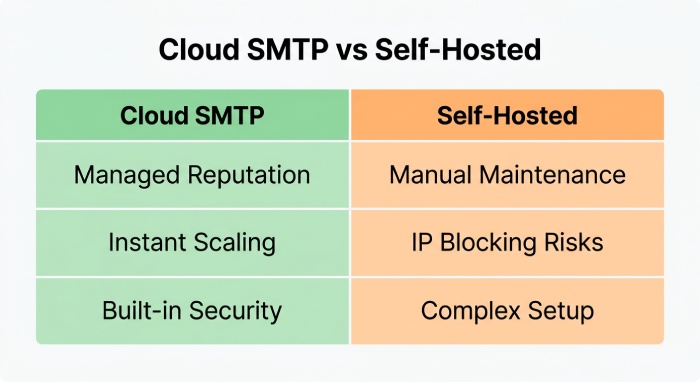
- Open source smtp and self-hosted smtp (e.g., Postfix/Exim) can be viable with expert ops, but you must own IP reputation, DMARC monitoring, blocklist remediation, and smtp authentication at the edge. That’s why many teams prefer a cloud smtp email provider with proven deliverability controls.
- Modern ESPs and email marketing services—Mailchimp, Brevo (formerly Sendinblue), Omnisend, Klaviyo, MailerLite, ConvertKit, Kit, GetResponse, EmailOctopus, Beehiiv, Constant Contact, plus CRMs like HubSpot, Pipedrive, and EngageBay—excel at newsletters, email campaigns, email outreach, and marketing automation while handing off transactional emails to a dedicated hosted smtp server.
Implementation checklist
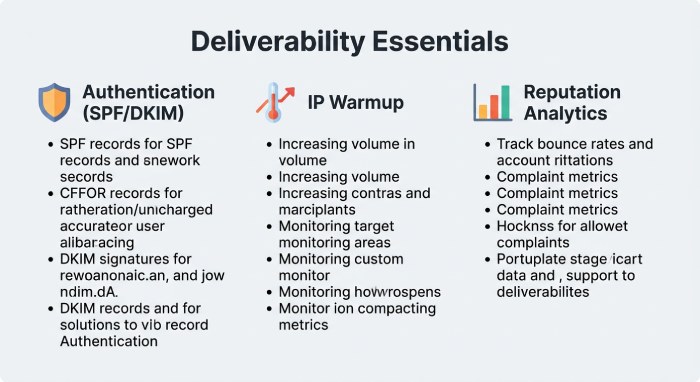
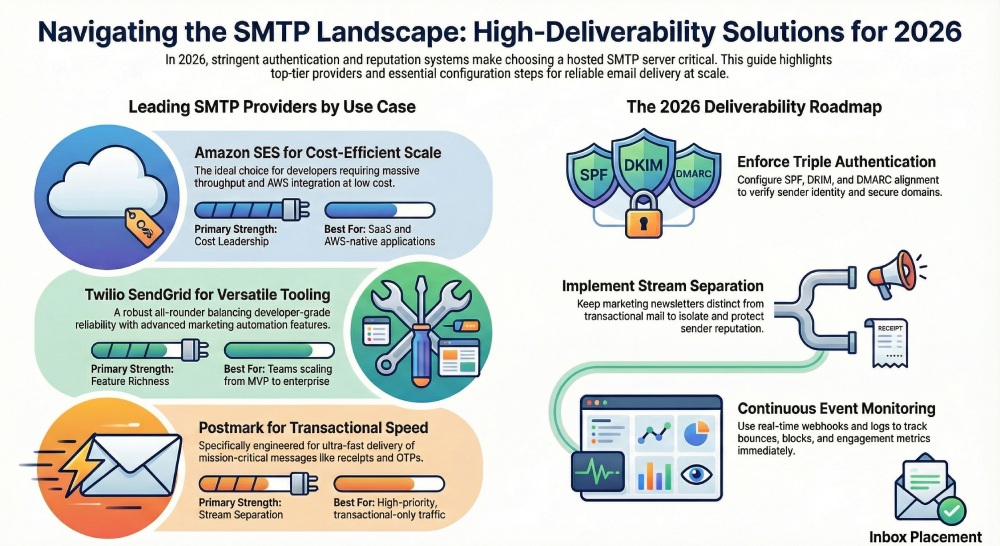
- Configure SPF/DKIM, align DMARC, and lock down smtp credentials per environment.
- Separate marketing and transactional streams to protect email reputation and optimize email deliverability.
- Tie smtp integration events to your analytics stack; review email analytics for bounces, blocks, and engagement.
- Document smtp port policies, email sender address conventions, and fallback smtp providers for resilience.
- Use Newsletter Tools and an email platform that can export HTML email templates to your smtp server for consistent branding.
SMTP Server #7 — Brevo (Sendinblue)
Why it stands out for budget-conscious teams
Brevo (formerly Sendinblue) bridges an accessible smtp server with an all‑in‑one suite for email marketing, SMS, and lightweight CRM. As a hosted smtp server, it’s an easy way to add a dependable smtp relay to sites, apps, and newsletter platforms without managing a self-hosted smtp stack. For teams moving from free smtp servers or basic ESPs, Brevo’s blend of marketing automation and transactional emails can streamline both promotional and operational messaging.
Deliverability and setup essentials
Brevo focuses on email deliverability with optional dedicated IPs, domain authentication guides, and a built-in warmup scheduler to protect email reputation. The platform’s deliverability tools include inbox placement testing, blocklist insights, and realtime logs for outgoing email. SMTP authentication is straightforward, and you can connect via smtp port 587/465, REST APIs, or native integrations with popular email clients and CMS tools for rapid email sending.
a. Strengths and the throughput caveat
- Strengths: An approachable smtp service with CRM/SMS, prebuilt email templates, simple smtp configuration, and clear analytics for email campaigns. As an email provider, Brevo also offers granular segmentation, newsletter creation, and basic marketing automation that rivals entry‑level email marketing services.
- Caveat: Entry tiers enforce email throughput and email limit caps, which can constrain bursty bulk email during promotions. Plan carefully if you anticipate spikes from newsletter signup drives or seasonal email outreach.
SMTP Server #8 — SMTP.com
Deliverability engine for agencies and brands
SMTP.com is a veteran hosted smtp server known for managed onboarding, feedback loops, and reputation monitoring. Agency teams appreciate pre‑warmed dedicated IPs that reduce risk when shifting large volumes of transactional emails or high‑frequency bulk email. Compared with open source smtp options, its guided setup and hands‑on support shorten time‑to‑value.
a. Strengths
- Seasoned infrastructure, proactive deliverability support, and detailed smtp integration documentation. Its transactional email service includes webhooks, event logs, and tight api integration for custom apps.
- Excellent for multi‑brand email platform rollouts where consistent outgoing email and shared governance over smtp credentials matter.
b. Caveats
- The UI/UX can feel dated compared with modern cloud smtp dashboards. While it excels in reliability, you may miss the more polished workflows found in newer newsletter software or developer‑centric tools.
SMTP Server #9 — Elastic Email
Thrifty pricing with a capable API
Elastic Email is a cost‑efficient smtp service that appeals to startups and SaaS products managing variable or bursty email sending. It offers per‑message smtp pricing that can undercut mainstream smtp providers, plus a strong API and clear documentation for smtp tutorial‑style setups and quick smtp test verifications. For many, it serves as a pragmatic alternative in an smtp comparison against SendGrid, Mailgun, and Amazon SES.
Deliverability controls and list hygiene
You’ll find dedicated IP availability, suppression management, and throttle controls to balance email throughput with inbox performance. Built‑in email verification helps maintain list quality, and DMARC alignment checks support email deliverability best practices. Pair these with a consistent sender domain and a clean email sender address to protect long‑term reputation.
Caveat: Shared pools require discipline
If you remain on shared pools, rigorous list hygiene is a must. Poor neighbor behavior can impact email deliverability, so treat list growth, subject line testing, and cadence as first‑class tasks—especially when running frequent email campaigns or cheap email marketing pushes.
SMTP Server #10 — MailerSend
Modern developer experience with quick setup
MailerSend brings a clean UI and developer‑friendly endpoints that make smtp configuration and api integration painless. You get domain authentication guides, dedicated IP options, and smart warmup so transactional emails ramp safely. As a hosted smtp server, it suits product teams that value intuitive logs, sandbox modes, and fast environment provisioning.
a. Webhooks, templates, and inbound routes
- Webhooks and inbound routes enable bi‑directional workflows for support systems, CRMs, and help desks.
- The templating system supports personalized bulk email while preserving consistent branding. It’s easy to plug into newsletter platforms like Beehiiv or MailerLite, or to sync activity back into CRMs such as HubSpot, Pipedrive, or EngageBay for email analytics and CRM with email reporting.
- Caveat: The ecosystem of third‑party integrations is smaller than giants like Mailchimp or Omnisend, though core features cover most transactional email service use cases.
SMTP Server #11 — Netcore Email API (formerly Pepipost)
Asia‑first scale with adaptive delivery
Netcore Email API is an ESP with deep regional expertise, performance SLAs, and AI‑assisted routing to improve email deliverability across diverse geographies. Its adaptive delivery engine, AMP for Email support, and validation pipelines help transactional emails stand out while protecting reputation. It’s a strong cloud smtp candidate for fast‑growing marketplaces and fintechs.
a. Strengths and tradeoffs
- Strengths: Competitive SLAs, robust analytics, and optimization tuned for high‑volume outgoing email across APAC. It’s well suited to cross‑border email campaigns and marketing automation that must localize timing and content.
- Caveat: Documentation and community content skew less Western‑focused, so teams used to Mailgun, SendGrid, or Amazon SES docs may face a learning curve.
SMTP Server #12 — Mailchimp Transactional Email
Cohesion for existing Mailchimp stacks
If you already rely on Mailchimp for email marketing software, audience management, and Newsletter Tools, Mailchimp Transactional Email provides a seamless smtp relay for receipts, alerts, and password resets. You gain templating parity, granular logs, and reputation tooling, keeping both promotional and operational streams inside one email provider. This unity simplifies list syncing, email list management, and pricing comparison across your stack.
a. Caveat: Requires a paid Mailchimp plan
Access to the transactional add‑on requires an active Mailchimp subscription. If you’re exploring smtp alternatives to consolidate costs, run a Side-by-Side Comparison with EmailToolTester or a custom Cost Calculator before committing.
Implementation tips that boost outcomes across providers
- Authentication: Configure SPF, DKIM, and DMARC, then enable dmarc monitoring for policy alignment and email security. Confirm smtp authentication, rotate smtp credentials periodically, and document your smtp configuration.
- Testing: Run an smtp test against staging first. Validate content, links, and headers using deliverability tools and an email deliverability study checklist. Try different email subject lines and preview across popular email clients.
- Governance: Define an email limit for each environment to avoid accidents, and monitor email throughput. Establish list standards, double opt‑ins, and periodic re‑engagement to support email deliverability best practices.
- Integrations: Most services offer SMTP and REST for swift smtp integration with website forms, ecommerce checkouts, or newsletter signup flows. API webhooks can feed events into analytics stacks, data warehouses, or marketing automation tools.
- Content and platforms: Use email templates aligned with your brand and accessibility norms. Coordinate with your email marketing guide, choose email platform wisely (e.g., Omnisend, ActiveCampaign, Klaviyo, ConvertKit, GetResponse, EmailOctopus, Constant Contact, Flodesk, or Kit), and sync activity back to CRMs. Pair with newsletter software or newsletter platforms like Beehiiv or MailerLite to centralize outreach.
Where these fit in the broader ecosystem
Each of these smtp providers can run side by side with major ESPs and Transactional Email Service vendors such as SendGrid, Mailgun, and Amazon SES. While hosted smtp server options reduce overhead, advanced teams may still evaluate open source smtp and self-hosted smtp stacks for edge control—balanced against maintenance burden. For cost‑sensitive senders experimenting with free email marketing or a free email service, remember that free smtp servers often cap features and throttles; plan upgrades as volume and compliance needs grow.
Use cases that match the tools
- Transactional: High‑priority receipts, alerts, and password resets where timely delivery is paramount.
- Marketing: Scheduled newsletters, lifecycle drips, and promotional bulk email coordinated with email marketing and email automation tools.
- Hybrid: A split architecture where one smtp server handles transactional emails and another email provider or ESP drives campaigns—useful for risk isolation and clearer email analytics.
FAQs
Which smtp server is best for both marketing and transactional use?
Brevo and Mailchimp Transactional Email work well if you want tight cohesion with email marketing services and CRM data. If you prefer a specialist for transactional emails with strong API integration, consider SMTP.com or MailerSend.
How do dedicated IPs affect email deliverability?
Dedicated IPs isolate your email reputation from other senders, which helps stabilize inbox placement when volumes are steady. Pair them with warmup schedules, authentication, and consistent sending patterns to maximize outcomes.
Can I rely on free smtp servers for production?
Free smtp servers are fine for testing or very low volume, but they often impose strict email limits and throughput controls. For production, a paid smtp service with support and monitoring is safer and more scalable.
What smtp ports should I use?
Most providers support smtp port 587 for TLS submissions and 465 for implicit TLS. Follow your provider’s smtp tutorial and security guidance to align with modern standards.
How do I integrate these services with my stack?
Use SMTP credentials for quick smtp integration or the provider’s REST API for deeper workflows. Test carefully, monitor bounces and complaints, and automate list hygiene with email verification to protect reputation.
Key Takeaways
- Choose a hosted smtp server that matches your volume pattern, deliverability needs, and integration depth.
- Prioritize email deliverability with SPF, DKIM, DMARC, list hygiene, and disciplined warmup before scaling bulk email.
- Align transactional emails and email marketing workflows to share data, templates, and analytics where it makes sense.
- Test configuration, ports, and content thoroughly; monitor email throughput, reputation, and engagement continuously.