

The Sender Policy Framework is deceptively simple: publish a single SPF record as a TXT record in your domain DNS so receiving systems can check whether a connecting mail server is an authorized server to send on your behalf.
But when an SPF generator or GoDaddy’s wizard is used without understanding alignment and lookup limits, it can still let email spoofing slip through or cause DMARC to fail. The fix is not just “add SPF record” once; it’s to engineer one SPF record that aligns with DMARC records, fits within SPF syntax rules, and is tested against real email delivery paths to prevent email fraud reliably.
What SPF generators do (and don’t): GoDaddy’s wizard, quick wins, and blind spots about your senders
SPF generators and GoDaddy’s guided tools are great at scaffolding the basics. In your GoDaddy account, you can open Domain Portfolio, pick a domain, and in DNS management add TXT record entries quickly. For Professional Email or legacy systems like Media Temple Mail, the wizard often proposes include:secureserver.net and sets a sane TTL (Time to Live) so the TXT value propagates across nameservers. If your MX and outbound mail server are both inside GoDaddy’s stack, this can speed up email authentication and prevent email fraud in minutes.
Quick wins you can expect:
- A valid SPF syntax baseline (v=spf1) with a correct SPF record value
- Automatic includes for common GoDaddy services (e.g., Professional Email)
- A prompt to use your root domain selector correctly and avoid typos in DNS records
But generators don’t know your entire sending universe. Many GoDaddy customers also use Microsoft 365 from GoDaddy (or standalone Office 365), Linux Hosting or Gen 4 VPS for web apps, Dedicated Hosting for bulk sends, and Email Marketing platforms connected to an Online Store or Website Builder. If any of those systems relays via a different authorized server or uses a third-party Return-Path, the SPF rule needs to include them. Generators also can’t see if your nameservers are external; if your domain DNS lives off-platform, your DNS settings and domain settings may differ, and you must publish the TXT record wherever your authoritative nameservers reside. Nor can a wizard ensure DMARC alignment; that depends on how your Return-Path (envelope from) and header From domains match, and on whether DKIM records are correctly deployed.
Bottom line: GoDaddy’s wizard helps you add SPF record lines faster, but you still have to audit every mail server that sends for your brand, confirm each is an authorized server, and tune the TXT record to prevent email fraud without tripping DMARC.
The SPF traps that scorch DMARC: duplicate records, 10‑lookup limit, +all/~all misuse, bad includes, redirect/ptr, and quoting errors
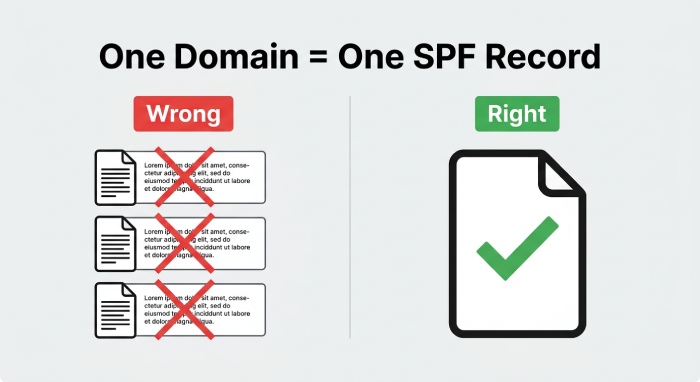
a. Duplicate and fragmented SPF records
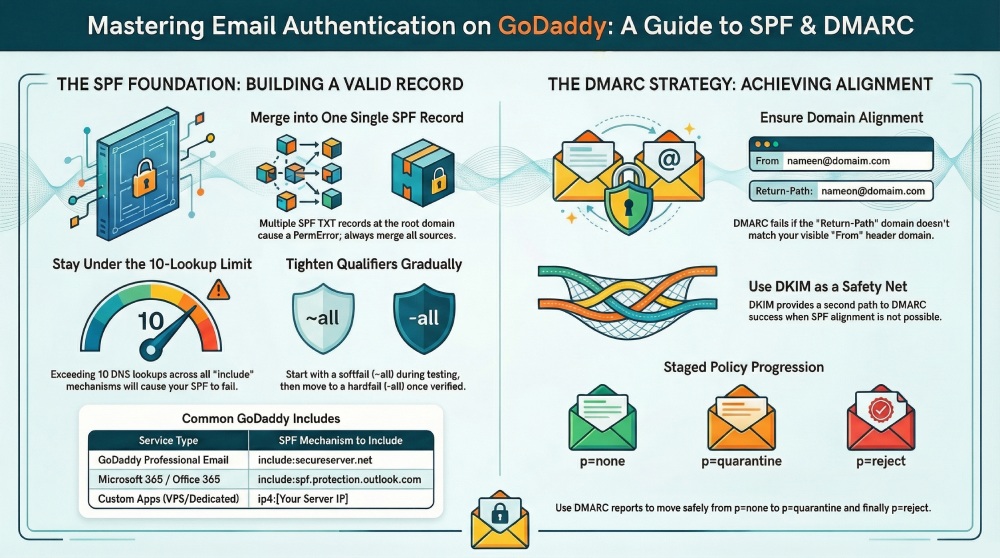
SPF requires one SPF record per hostname. Publishing multiple TXT records that each start with v=spf1 at the root domain causes an SPF PermError. Many admins “add TXT record” for each tool, but you must merge them into one SPF record. Use ip4/ip6 mechanisms and includes in a single SPF rule, then edit SPF records carefully instead of stacking duplicates. If you must delegate a subdomain to a vendor, keep the root domain SPF clean and aligned forDMARC.
b. DNS lookups and bad include/redirect/ptr choices
SPF has a hard 10-lookup limit across include, a, mx, exists, and redirect. Each include (such as include:secureserver.net for Professional Email or spf.protection.outlook.com for Microsoft 365) consumes lookups, which recurse into the vendor’s DNS. Too many includes or chaining redirect will exceed 10, turning your SPF record into a fail even if the mail server is technically authorized. Avoid ptr entirely (deprecated and slow), and only include what you use.
i. How to count lookups quickly
- Count each include, a, mx, exists, and redirect in your SPF syntax.
- Expand nested includes by querying the TXT of each include domain to estimate total DNS queries.
- Keep headroom for future senders; don’t spend all 10 on day one.
c. Qualifier misuse: +all, ~all, and -all timing
Using +all effectively says “every mail server is an authorized server,” which invites email spoofing and will not prevent email fraud. A softfail (~all) can be useful during discovery but leaves room for abuse if left in place indefinitely. A well-run domain moves from ~all to -all after inventory and testing, so unauthenticated senders get blocked. Tie this to DMARC policies over time.
d. Syntax, quoting, and TXT formatting errors
Quoting errors, stray semicolons, or line wraps over 255 characters can corrupt the TXT value. Always publish the SPF record as a single TXT record string (long strings can be split into quoted segments, but the effective value must parse as one). Mind spaces around mechanisms, keep mechanisms in a logical order, and verify the TTL so changes propagate quickly across nameservers when you edit SPF record entries. Simple syntax issues commonly derail DMARC and email delivery.
When SPF pass still equals DMARC fail: alignment rules, Return‑Path vs From, third‑party senders, and DKIM as a safety net
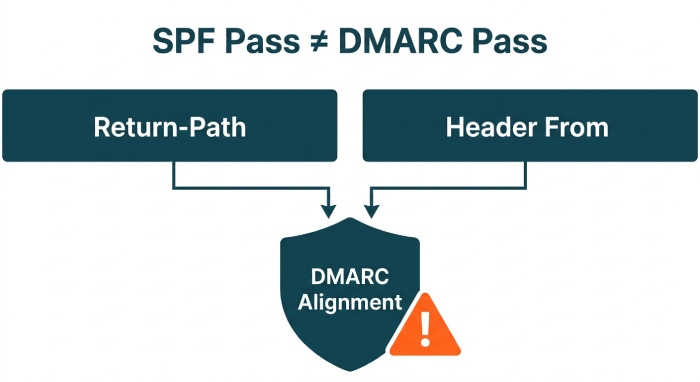
DMARC evaluates alignment, not just pass/fail. SPF validates the connecting mail server against the domain in the Return-Path (MAIL FROM). DMARC then checks whether that Return-Path domain aligns with the visible From domain. If your bulk sender uses a vendor-owned Return-Path (e.g., vendor.example-mail.com) while your From is your root domain, SPF can pass but DMARC still fails. That’s why “SPF pass still equals DMARC fail” happens so often with third-party senders and Email Marketing tools.
Key points:
- Use custom MAIL FROM domains with vendors so the SPF-validated domain aligns with your From. Many platforms—whether running on Linux Hosting, Gen 4 VPS, or third-party clouds—support this.
- For Microsoft 365 and Office 365, rely on include:spf.protection.outlook.com and sign with DKIM records for your domain. DKIM provides a second path to DMARC pass if alignment via SPF is not possible for certain flows.
- If GoDaddy Professional Email is in use, include:secureserver.net helps authorize its mail server IP ranges, but you still need DMARC alignment and DKIM.
- Consider Advanced Email Security and proper DMARC records with rua/ruf to monitor alignment and prevent email fraud at scale.
If you cannot align SPF for a sender (for example, the vendor refuses custom Return-Path), use DKIM as a safety net. When the DKIM signature domain aligns with the header From, DMARC can pass even if SPF doesn’t align. In practice, a resilient posture uses both SPF and DKIM—properly aligned—to satisfy DMARC across all mail streams.
2026 Data Insights: How SPF Misconfiguration Breaks DMARC
| Metric | 2026 Statistic | Security & Deliverability Impact | |
| 1 | SPF Misconfiguration Rate | ~2.9% of domains publish invalid SPF records | Syntax errors or missing mechanisms can completely invalidate DMARC authentication |
| 2 | DNS Lookup Limit Violations | ~20% of SPF records exceed the 10 DNS lookup limit | Common with auto-generated SPF (e.g., GoDaddy), causing silent SPF failures |
| 3 | DMARC Failure Root Cause | ~70% of DMARC failures are tied to SPF/DKIM misalignment | SPF “pass” without alignment still results in DMARC failure |
| 4 | False Authentication Confidence | ~25–30% of emails pass SPF but fail DMARC | Misuse of SPF generators creates a false sense of protection |
| 5 | Deliverability Degradation | Up to ~35% drop in inbox placement for misconfigured domains | Poor SPF + DMARC alignment directly impacts sender reputation and inbox trust |
Building a single, aligned SPF on GoDaddy—and proving it works
Design for one SPF record that authorizes every legitimate mail server while staying within the 10-lookup ceiling and aligning to DMARC.

A practical workflow in your GoDaddy account:
- Inventory every sender
- List systems that send: Microsoft 365 from GoDaddy, Professional Email, Online Store receipts, Website Builder contact forms, Dedicated Hosting apps, Gen 4 VPS cron jobs, Media Temple Mail migrations, and any external Email Marketing or CRM. Confirm each platform’s required include and any fixed IPs.
- Choose the right include per platform
- Professional Email: include:secureserver.net
- Microsoft 365/Office 365: include:spf.protection.outlook.com
- In-house apps on Linux Hosting, Gen 4 VPS, or Dedicated Hosting: prefer sending through your authenticated relay; otherwise add ip4/ip6 of the outbound mail server as an authorized server.
- Budget your lookups
- Keep includes to essentials and avoid nested chains. Flatten only when necessary and with care to TTL and vendor updates.
- Publish a single TXT record
- In DNS management, add TXT record at the root domain with a concise SPF syntax ordering ip4/ip6 before includes and end with ~all initially. Verify DNS settings match the authoritative nameservers; if your domain DNS is off GoDaddy, publish there.
- Tighten to -all
- After testing and DMARC validation, change ~all to -all to better prevent email fraud.
Proving it works:
- Validate DNS
- Use dig/nslookup to confirm the TXT value and SPF record value on your root domain match what you expect, across all nameservers. Respect TTL (Time to Live) before retesting after you edit SPF record data.
- Send controlled tests
- From each system, send to external mailboxes. Inspect Authentication-Results headers to confirm SPF pass and note which domain was evaluated. Ensure the evaluated domain aligns with From for DMARC.
- Read DMARC reports (rua/ruf)
- Configure DMARC records with rua aggregate and ruf forensic mailboxes. Analyze reports to see which IPs and vendors passed SPF or DKIM and whether alignment succeeded. Tools and services like DuoCircle can help visualize and triage DMARC data at scale.
- Move policy from none to quarantine/reject safely
- Start with p=none to observe. When reports show only known authorized server sources passing and aligned, advance to p=quarantine, then p=reject. This staged progression markedly improves domain protection and helps prevent email fraud without disrupting email delivery.
Operational hygiene around the domain matters too. Use 2-step verification on your GoDaddy account, enable Domain Protection for registrar-level safety, and ensure auto-renew is active so critical DNS doesn’t lapse. Manage everything from the Email & Office Dashboard when configuring Microsoft 365 licenses, and confirm WHOIS contact details are accurate. While GoDaddy offers many adjacent tools—Airo AI Builder, Domain Name Generator, Discount Domain Club—your SPF/DMARC success still hinges on accurate DNS records, careful domain settings, and disciplined updates whenever a new mail server or third-party sender enters the picture.
Finally, remember that TXT, DKIM, and DMARC work together: publish correct DKIM records for each platform, keep one SPF record authoritative for your domain DNS, and you’ll align policy and practice to reliably prevent email fraud.