

How ARC resolves email authentication for forwarded messages
When you forward an email, it might look like the message is simply being passed along to the recipient, as it is. You and your reader will see it as unaffected, but to the receiving server, it can appear very different.
On the surface, forwarding a message rarely changes anything, but behind the scenes, the very fundamentals of the email can change. The sending server, return path, routing information, and even parts of the message header may be modified during the forwarding process. In some cases, the forwarding service or mail server might even add a footer to the message, effectively changing its content.
This means that when the receiving server runs authentication checks before letting the forwarded email in, the message may no longer pass SPF, DKIM, and DMARC in the same way it did originally.
Even though the email might be completely legitimate, to the receiving server, even a small alteration like the footer, subject line, or change in routing information can make the email look suspicious.
What happens to an email during forwarding?
After you send an email, the following changes can happen that can break email authentication:
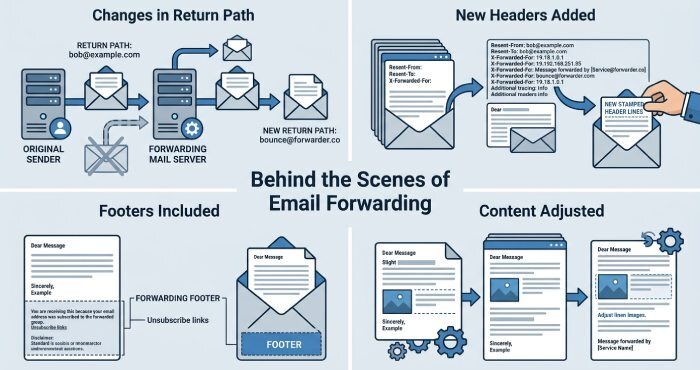
Changes in the return path
When an email is forwarded, the return path may be changed to the forwarding server instead of the original sender. This helps the forwarding service manage bounce messages, but it also makes the email look a bit different during checks.
New headers are added
Forwarding servers add extra headers to show where the email has traveled. “Received” headers are the most common. Each server adds its own line, so there is a full record of the email’s journey.
Footers or extra content may be included
Some services or mailing lists add small things like disclaimers, signatures, or brand names. These are usually added at the bottom and may not seem important to the reader.
Small content adjustments
Sometimes the email changes in small ways that are not visible. This can include tiny formatting or structure changes, but the email is still slightly different from the original.
Why these changes matter
Receiving servers check all these details to decide if an email is safe. Even small changes can affect this check, which is why forwarded emails can face issues.
Why forwarded emails often fail email authentication checks
It’s common for us to forward emails, use mailing lists, or rely on different servers to handle messages. However, we don’t realize that this can impact authentication and deliverability. So, here is a technical explanation of why forwarded emails often run into authentication issues problems, even if they are completely legitimate and harmless:
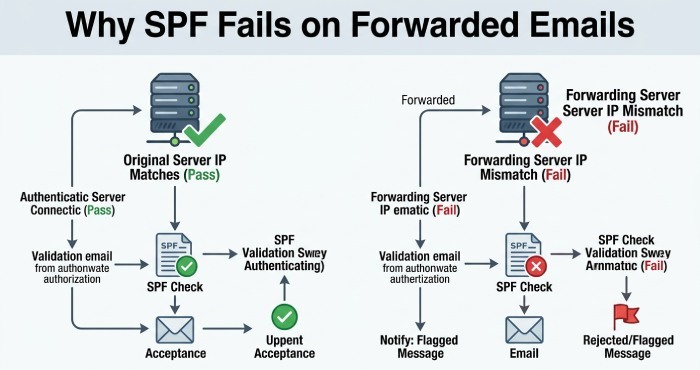
SPF can fail due to an IP mismatch
SPF checks if the email is sent from an approved server. It looks at the sending IP address and compares it with the domain’s SPF record. When an email is forwarded, the forwarding server sends the message instead of the original sender. This means the IP address is now different. Since this new server is usually not listed in the original domain’s SPF record, the SPF check can fail.
So even if the email started from a trusted source, forwarding can make it look like it came from an unapproved server.
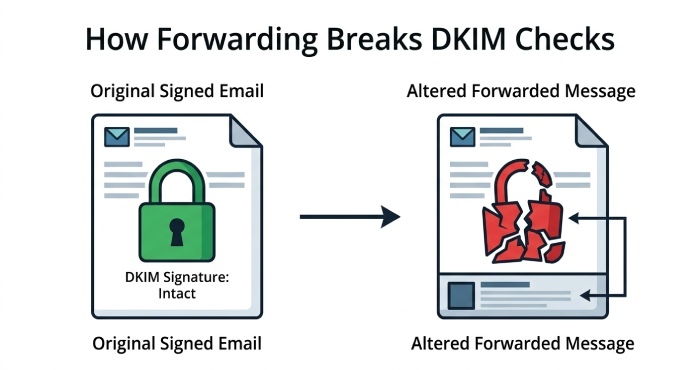
DKIM can break when the email changes
DKIM works by adding a digital signature to your email. This signature is created using certain parts of the message, like the body and some headers. When the email reaches the receiving server, it checks if those parts are still the same.
The problem starts when an email is forwarded. The forwarding server may add headers, change formatting, or include a small footer. These changes may look harmless, but they can affect the signed parts of the email. When that happens, the DKIM signature no longer matches, and DKIM fails. Even though the email is real, it now looks altered to the receiving server.
DMARC can fail because of DKIM and SPF
DMARC depends on both DKIM and SPF. It checks if at least one of them passes and also verifies alignment with the sender’s domain. When an email is forwarded, DKIM may fail due to changes in the message, and SPF may fail because of the new sending server. When both of these fail, DMARC fails as well. This can cause the email to be marked as suspicious, sent to spam, or even rejected.
What is ARC?
Authenticated Received Chain (ARC) is an email authentication protocol designed to ensure the legitimacy of an email as it passes from one server to another. When an email is forwarded, the intermediary server checks whether the original message passed other authentication checks like SPF, DKIM, and DMARC before making any forwarding-related changes. It then adds this information to the email through ARC headers.
So, even if forwarding changes the message and causes DKIM or SPF to fail later, the final receiving server can still see that the email originally passed authentication checks and is more likely to trust it.
How ARC works in simple terms
Think of ARC as a way to carry proof that an email was safe when it first started its journey.
First, an email is sent and passes important checks such as SPF, DKIM, and DMARC. At this point, the message is trusted. Then the email reaches a forwarding server. Before sending it ahead, this server checks whether the email has already passed those checks. If everything looks good, ARC steps in.
ARC saves these results and adds them to the email as special headers. These headers act like a record of what happened before any changes were made.
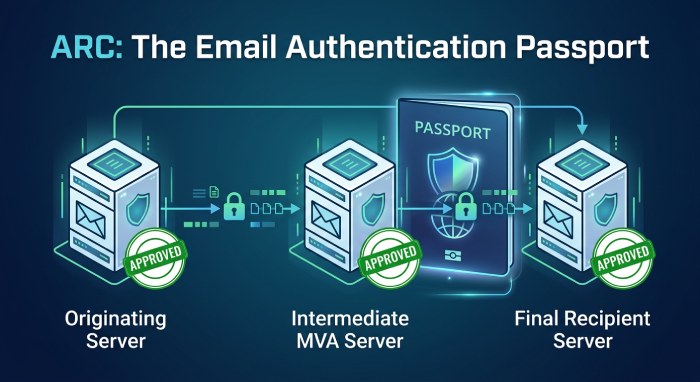
You can think of it like a passport. At every stop, the email gets a stamp that shows it was verified and handled properly. Even if something changes later, those stamps are still there as proof.
As the email moves forward, other servers can also add their own ARC details. This builds a chain of trust. Each step shows that the email was checked and passed along safely. Finally, when the email reaches the receiving server, it runs the usual checks again. If something fails because the email was forwarded, the server can look at the ARC records.
By reading this chain, the receiving server can see that the email was originally safe. This helps it make a better decision instead of rejecting or marking the email as spam.
In simple terms, ARC ensures that a good email does not lose its trustworthiness just because it was forwarded. It gives receiving servers more context, so they do not rely solely on the final check but also consider the email’s full journey.
How does ARC solve the authentication problem for forwarded messages?
As we discussed earlier, forwarding can change some parts of the email, which the receiving server may perceive as signs of tampering or suspicious activity. This causes the message to fail the SPF, DKIM, and DMARC checks and be flagged as untrustworthy. ARC helps solve this problem by preserving the original authentication results before those forwarding-related changes are made.
Let’s dig deeper to understand how ARC fills the gaps left by other email authentication protocols and enables emails to reach their recipients securely.
Retains the original authentication results
When a forwarding server receives an email, it can first check whether the original message passed SPF, DKIM, and DMARC. ARC then saves these results before the email is forwarded.
So, even if the forwarded email later fails SPF and/ or DKIM because something changed during forwarding, the final receiving server can still see that the email was originally legitimate.
Builds a chain of trust across multiple servers
When an email reaches the intermediary server, that server usually adds a “Received” header. This alteration in the header can cause DKIM to fail.
To solve this, the intermediary server runs authentication checks to confirm whether the message passed SPF, DKIM, and DMARC. It then adds ARC headers to the message.
These ARC headers include:
- ARC-Authentication-Results (AAR), which stores the authentication results
- ARC-Message-Signature (AMS), which signs the email content and ARC results
- ARC-Seal (AS), which protects the entire chain of ARC information
No matter how many times the email is forwarded, the intermediary servers continue to repeat the same process and add their own ARC headers. This creates a chain of trust that shows that the message was handled properly at every stage of its journey.
Helps the final receiving server verify the email
When the email finally reaches the receiving server, that server first performs the usual SPF, DKIM, and DMARC checks. If the message fails authentication checks because the email was forwarded, the server can then review the ARC chain. By checking the ARC signatures and authentication results, it can confirm that the email was originally legitimate and was not tampered with in transit.
When should you use ARC along with SPF, DKIM, and DMARC?
ARC is not something every domain needs right away. But in some cases, it can make a big difference in how your emails are handled. So, consider deploying it in the following scenarios:
- If you often forward emails
- You use mailing lists or third-party services to send or forward emails.
- When you start swimming SPF, DKIM, or DMARC failure without a clear reason.
- If your domain’s email deliverability is dropping after forwarding. This is because there are high chances that your emails are landing in spam or getting rejected.
In simple terms, if your emails pass through multiple servers before reaching the final inbox, ARC can help protect their trust.
Final words
If your emails fail to reach their recipients after being forwarded, the problem might not be with the message but with how it was handled. By using ARC in combination with SPF, DKIM, and DMARC, you can help receiving servers trust your forwarded emails and reduce the risk of them being sent to spam or rejected. To learn more, get in touch with DuoCircle.