

In today’s digital landscape, especially within hybrid cloud frameworks, email authentication has become increasingly vital. Organizations now utilize a mix of on-site infrastructure, cloud services, and external applications for their email management. In this decentralized setup, ensuring effective email authentication and routing is crucial for both security and successful delivery.
Among the various protocols for authentication, Sender Policy Framework (SPF) is particularly significant. The “all” mechanism within SPF serves as a decisive factor in determining the treatment of unauthenticated emails. While it seems straightforward, its impact on the routing, filtering, or rejection of emails is substantial.
Understanding SPF and the Role of all
Understanding SPF
The Sender Policy Framework (SPF) is an email validation method that enables domain administrators to designate which servers can send emails on their domain’s behalf. This data is kept in a DNS TXT record and is utilized by receiving mail servers to verify email legitimacy.
Function of the All Mechanism
Located at the end of an SPF record, the all mechanism serves as an overarching rule. It dictates the action to take for any email source that isn’t covered by the previously specified authorized sources.
Variants of All Qualifiers
The working of the all mechanism is contingent on its qualifier type:
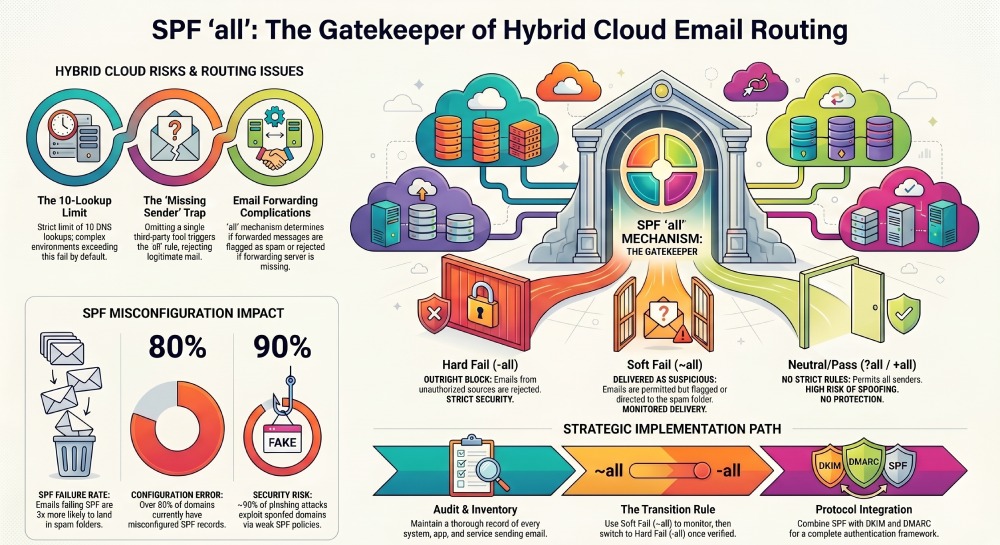
- -all signifies a hard fail, requiring unauthorized emails to be blocked.
- ~all indicates a soft fail, permitting emails but tagging them as potentially dubious.
- +all permits all senders, which poses security risks and is discouraged.
- ?all applies a neutral policy, imposing no strict rules.
The receiving mail server refers to this final directive to determine the handling of incoming messages.
Hybrid Cloud Email Routing: A Complex Landscape
Various Email Sources in Hybrid Setups
In hybrid cloud setups, various email systems operate together. These often comprise local mail servers, cloud services like Microsoft 365 or Google Workspace, third-party applications such as marketing tools or CRMs, as well as secure email gateways.
Understanding Email Routing
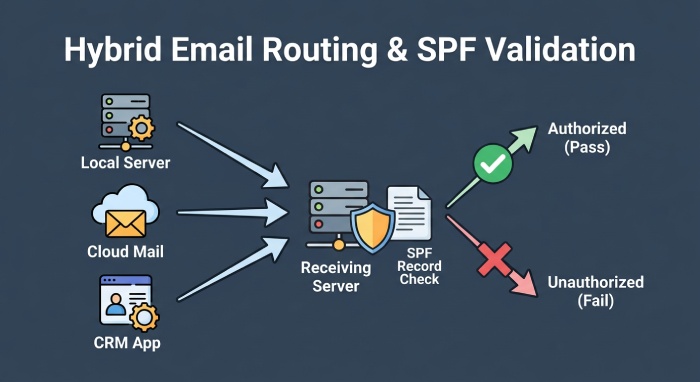
When an email arrives, the server checks the sender’s IP address and compares it to the domain’s SPF record. If the IP is listed as an authorized sender, the email successfully passes SPF validation. If not, the mechanism specified in the SPF record dictates the subsequent actions.
Importance of SPF Precision
In hybrid setups where multiple systems send emails, it’s crucial to include every authorized sender in the SPF record. Omitting just one source can lead to legitimate emails failing authentication and being incorrectly routed.
How SPF all Influences Email Routing
Default Handling for Unauthorized Email Senders
The “all” mechanism dictates how emails are treated when they do not pass SPF checks. If “-all” is in place, unauthorized emails are generally rejected. Conversely, with “~all,” such emails tend to be accepted but may be sent to the spam folder or marked as questionable. In hybrid setups, legitimate emails might unintentionally be misclassified if all sending sources are not appropriately configured.
Implications for Multi-Source Email Systems
Hybrid environments utilize various systems to send out emails, including in-house applications, automated services, and third-party platforms. Each of these must be explicitly authorized within the SPF record. If any source is omitted, emails originating from that source will not pass SPF validation. The “all” mechanism will then dictate the email’s fate, possibly leading to spam classification or outright rejection.
Email Forwarding and SPF Validation Issues
Forwarding emails complicates SPF validation. When an email is forwarded, the forwarding server handles the delivery, but SPF checks still apply to the original sender’s domain. If the forwarding server is absent from the SPF record, the email will fail SPF validation. The “all” mechanism then decides if the email gets rejected or delivered with a warning. This situation is particularly prevalent in hybrid systems where routing can frequently change.
Relationship with Email Security Gateways
Secure email gateways and filtering solutions heavily depend on SPF outcomes to make routing choices. When an email does not pass SPF, the “all” qualifier influences how the gateway responds. A hard fail typically leads to rejection, while a soft fail might permit delivery but with decreased trust. Thus, the “all” mechanism plays a crucial role in how these systems categorize and route emails.
Effects on Deliverability and Domain Trust
Regular SPF failures can adversely affect both email deliverability and the reputation of the domain. Emails that often trigger the “all” mechanism may either land in the spam folder or be outright rejected by the recipient’s servers. Over time, this erosion of trust can hinder legitimate emails from successfully reaching inboxes.
Key Statistics Highlighting the Impact of SPF all on Email Routing
| Statistic | Insight | Impact on SPF all |
| 1. Over 80% of domains have misconfigured SPF records | A large number of organizations fail to properly configure SPF | Misconfigured records often trigger the all mechanism, leading to incorrect email routing |
| 2. Nearly 30% of legitimate emails fail SPF due to missing senders | Many hybrid environments overlook third-party or cloud senders | Emails fall under the all rule and are frequently marked as spam or rejected |
| 3. Around 90% of phishing attacks use spoofed domains | Attackers exploit weak SPF policies like ~all or +all | Weak all configurations allow malicious emails to bypass strict routing controls |
| 4. SPF has a strict 10 DNS lookup limit | Complex hybrid setups often exceed this limit | When exceeded, SPF fails and the all mechanism determines routing, often negatively |
| 5. Emails that fail SPF are 3x more likely to land in spam | Email providers heavily weigh SPF results in filtering decisions | The all qualifier directly influences whether failed emails are delivered, flagged, or rejected |
Real-World Hybrid Cloud Scenario
- Configuration Challenge Example: Imagine a company that operates an on-premises Exchange server, utilizes Microsoft 365, and employs a third-party marketing service. If the SPF record lists only Microsoft 365 and concludes with ~all, messages sent through the marketing platform will not pass SPF validation.
- Resulting Delivery Issues: Since the marketing service lacks authorization, the soft fail mechanism is triggered. Consequently, emails are likely to be directed to the spam folder rather than landing in the inbox.
- Updated SPF Configuration: By modifying the SPF record to encompass all valid sources and changing it to -all, the organization ensures that authorized emails are successfully validated, while those that are not are blocked. This adjustment enhances both email routing efficiency and overall security.
Risks of Misconfiguring all in Hybrid Environments
- Excessively Rigid Settings: Implementing -all without accounting for all legitimate sending sources can lead to the rejection of valid emails. This risk is particularly heightened during migrations or system upgrades.
- Excessively Lenient Settings: Utilizing ~all or +all can permit unauthorized emails to go through, raising the likelihood of spoofing and phishing incidents.
- Inadequate SPF Records: Neglecting to list all authorized sending sources can result in SPF failures. Such failures activate the all mechanism, which can lead to the misdirection or blocking of emails.
SPF Lookup Limits and Their Impact
- Limitations on DNS Lookups: The number of DNS lookups permitted for SPF records is capped at 10. In hybrid settings, the use of several include statements can rapidly approach this ceiling.
- Impact on Email Delivery:If the lookup threshold is surpassed, SPF assessment will not succeed. Consequently, the recipient’s server defaults to the all rule, which could lead to emails being either rejected or classified as spam.
Best Practices for Managing SPF all
- Keep a Thorough Inventory of Email Senders: It is essential for organizations to keep a record of all systems that send emails under their domain. This guarantees that each legitimate sender is represented in the SPF record.
- Implement Soft Fail During Transitions: When transitioning systems, it’s recommended to adopt a soft fail policy (~all) to observe email behavior while minimizing the chance of outright rejection. Once all sources have been validated, the policy can be made stricter with a hard fail (-all).
- Streamline SPF Records: To enhance SPF evaluation efficiency and avoid failures, it’s important to limit unnecessary DNS lookups and remove duplicate entries.
- Integrate SPF with Other Protocols: To establish a robust email authentication framework, SPF should be implemented in conjunction with DKIM and DMARC.
- Conduct Regular Monitoring and Testing: Ongoing testing and monitoring are crucial for promptly detecting issues and ensuring SPF configurations remain precise as the environment changes.
Conclusion
The SPF all mechanism is vital for managing the treatment of emails that do not pass authentication checks. Its significance is heightened in hybrid cloud infrastructures that involve multiple systems for email delivery.
An appropriately set up all rule guarantees that non-compliant emails are handled properly while ensuring the smooth delivery of legitimate messages. Conversely, incorrect configurations can result in major complications, including misdirected spam, message rejections, and diminished security.
By diligently overseeing SPF records to incorporate all legitimate sources and using the right all qualifier, organizations can secure dependable email routing, enhance security measures, and maintain consistent email deliverability within hybrid cloud settings.