

Email authentication serves as the foundation for effective email deliverability, with the Sender Policy Framework (SPF) being instrumental in confirming the legitimacy of an email sender representing a domain. Nevertheless, SPF is susceptible to complications. A prevalent and often exasperating problem is SPF lookup failure, which can undermine your email deliverability and tarnish your sender reputation without notice.
This comprehensive guide will examine the implications of SPF lookup failure, the reasons behind its occurrence, and crucially how to identify and rectify the issue efficiently.
What Is an SPF Lookup Failure?
An SPF lookup failure happens when the receiving mail server is unable to accurately assess your SPF record due to issues or constraints during the DNS lookup process. Rather than providing a definitive pass or fail outcome, the result may indicate:
- PermError (Permanent Error)
- TempError (Temporary Error)
Such failures hinder email servers from reliably validating your domain, potentially resulting in emails being categorized as spam or outright rejected.
Why SPF Matters for Email Deliverability
Prior to beginning any troubleshooting efforts, it’s essential to recognize the significance of SPF:
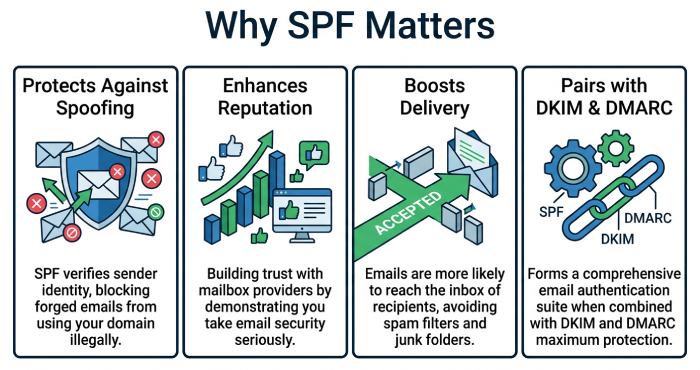
- It safeguards against email spoofing
- It enhances the reputation of the sender
- It boosts the likelihood of successful email delivery
- It operates in conjunction with DKIM and DMARC for comprehensive authentication
Failure to maintain an effective SPF record could result in your email campaigns and transactional messages failing to reach their intended recipients.
Common Causes of SPF Lookup Failure
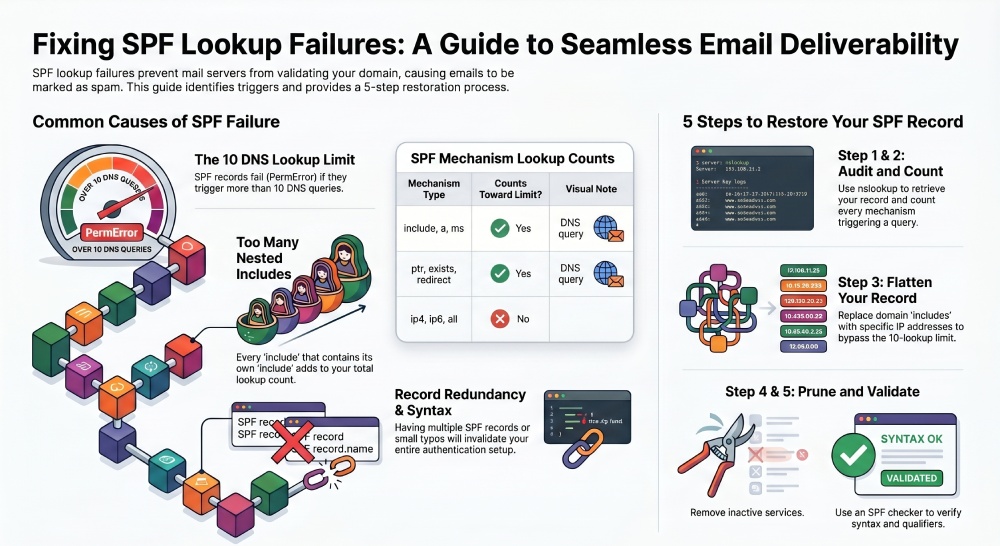
Exceeding the 10 DNS Lookup Limit
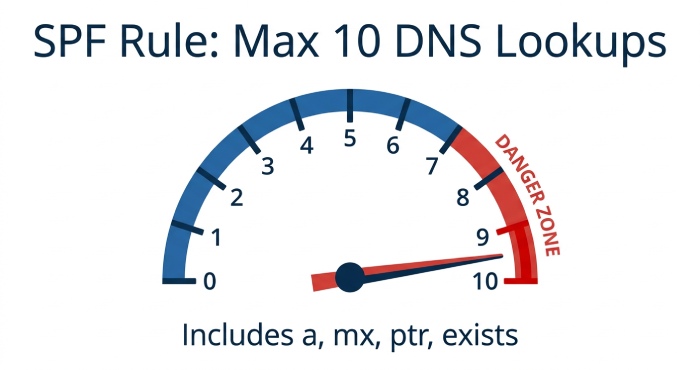
SPF has a strict rule: no more than 10 DNS lookups per SPF check.
What counts as a lookup?
- include
- a
- mx
- ptr
- exists
- redirect
Each of these mechanisms triggers a DNS query. If your SPF record exceeds the limit, the result will be a PermError.
Example Problem:
v=spf1 include:_spf.google.com include:mailgun.org include:spf.protection.outlook.com include:sendgrid.net include:amazonses.com -all
If each include expands further, you may easily cross the 10-lookup threshold.
Too Many Nested Includes
Includes often reference other SPF records, which may contain their own includes. This creates a chain reaction of DNS lookups.
Why it breaks:
- Each nested include adds to the total lookup count
- Deep nesting makes SPF evaluation complex and error-prone
Incorrect SPF Syntax
SPF records must follow strict formatting rules. Even a small typo can break validation.
Common syntax issues:
- Missing v=spf1
- Extra spaces or invalid characters
- Incorrect use of mechanisms
Example:
v=spf1 include:_spf.google.com include: mailgun.org -all
(The space after include: is invalid)
Multiple SPF Records in DNS
A domain should have only one SPF record. However, it’s common for organizations to accidentally create multiple SPF records when adding new services. For example, one record may authorize a CRM system while another authorizes a marketing platform.
When multiple SPF records exist, receiving servers cannot determine which one to use, resulting in an SPF failure. The correct approach is to merge all mechanisms into a single, consolidated SPF record to ensure proper evaluation.
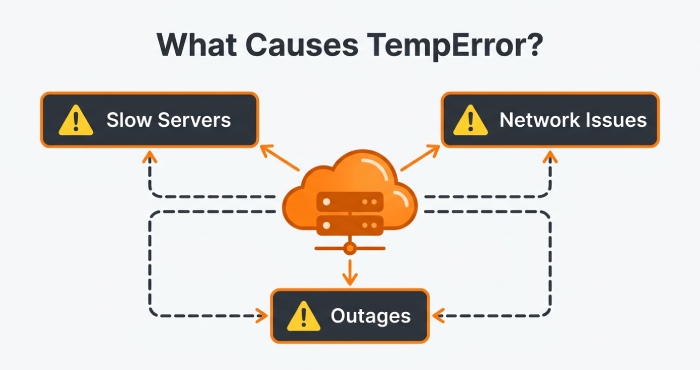
DNS Timeout or Temporary Errors
Sometimes the issue isn’t your SPF record itself but DNS resolution problems.
Causes:
- Slow DNS servers
- Network issues
- Temporary outages
This leads to a TempError, meaning the SPF check failed due to a temporary issue.
Use of Deprecated Mechanisms
Certain SPF mechanisms like ptr are discouraged or deprecated.
Why avoid them:
- They are inefficient
- Increase lookup complexity
- May not be supported by all mail servers
Misconfigured Third-Party Services
Many businesses use multiple email services like:
- Marketing platforms
- CRM tools
- Transactional email providers
Each service may require an SPF include. If not configured properly, it can cause lookup failures.
How to Troubleshoot SPF Lookup Failures
Step 1: Check Your SPF Record
The initial and crucial action is to obtain and evaluate your existing SPF record. This record, present in your domain’s DNS as a TXT record, delineates the servers that are permitted to send emails on behalf of your domain.
You can retrieve it using:
- DNS lookup tools (online SPF checkers)
- Command-line utilities like nslookup or dig
For example:
nslookup -type=txt yourdomain.com
Once you have the SPF record, carefully verify the following:
- Only one SPF record exists: The presence of multiple SPF records will result in a permanent error (PermError), since receiving servers will be unable to determine which record is reliable.
- Correct syntax: Verify that the record begins with “v=spf1” and that the formatting includes appropriate spaces between the mechanisms.
- Valid mechanisms: Please ensure that all components, such as include, ip4, ip6, mx, and a, are accurately formatted and refer to legitimate sources.
Even a small formatting mistake can invalidate the entire record, so this step lays the foundation for all further troubleshooting.
Step 2: Count DNS Lookups
SPF imposes a stringent restriction of 10 DNS lookups during each evaluation, and surpassing this threshold is frequently a primary cause of SPF failures.
To troubleshoot this:
- Ensure that each include directive in your SPF record is fully expanded.
- Verify whether the listed domains incorporate any supplementary include mechanisms that may involve nested lookups.
- Enumerate all the mechanisms that initiate DNS queries, including but not limited to: a, mx, ptr, exists, and redirect.
Enumerate all the mechanisms that initiate DNS queries, which encompass: include, MX, PTR, exists, and redirect.
Key rule:
The maximum number of DNS lookups should not exceed 10.
Utilizing SPF analysis tools can streamline this process, particularly when dealing with intricate configurations.
Step 3: Flatten Your SPF Record
SPF flattening is a strategy designed to minimize DNS lookups by substituting include directives with their corresponding resolved IP addresses.
Example:
Before flattening:
v=spf1 include:_spf.google.com include:sendgrid.net -all
After flattening:
v=spf1 ip4:192.168.0.1 ip4:192.168.0.2 -all
Why this helps:
- Eliminates nested DNS queries
- Keeps lookup count within limits
- Improves authentication speed and reliability
Important drawback:
Maintaining flattened SPF records necessitates ongoing attention. Should a service provider modify its sending IP addresses, your SPF record risks becoming obsolete without timely updates.
To mitigate this issue, numerous organizations have turned to automated SPF flattening solutions, ensuring their records remain current.
Step 4: Remove Unused Services
As time progresses, SPF records often gather obsolete or redundant entries, particularly when organizations change email service providers or discontinue specific services.
You should perform a full audit and remove:
- Old email service providers
- Inactive marketing platforms
- Deprecated third-party tools
- Duplicate or redundant include statements
Retaining obsolete entries in your SPF record can lead to an increase in DNS lookups and may pose security threats by permitting access to services no longer in use.
Maintaining a streamlined and efficient SPF record enhances manageability and significantly reduces the likelihood of errors.
Step 5: Fix Syntax Errors
The syntax of SPF records needs to be exact. A small error can disrupt the entire configuration and lead to authentication issues
Carefully review for:
- Missing spaces between mechanisms
- (e.g., include:spf.google.cominclude:sendgrid.net)
-
Incorrect qualifiers:
- + (pass, default)
- – (fail)
- ~ (soft fail)
- ? (neutral)
- Invalid or misspelled mechanisms
- Incorrect domain names
Once you have made the necessary corrections, it is essential to verify your SPF record with a trusted SPF checker to confirm that it adheres to all syntax requirements and lookup limitations.
Best Practices to Prevent SPF Lookup Failures
- Keep SPF Record Simple: Utilize essential tools and eliminate redundant services to minimize complexity and errors. A compact SPF record simplifies management and troubleshooting, while lowering the risk of misconfigurations and syntax errors. Routine maintenance ensures accuracy as email systems progress.
- Stay Within 10 DNS Lookups: Restrict the use of include, a, and mx mechanisms to keep DNS lookups under 10. Surpassing this threshold leads to SPF PermError and email delivery issues. Nested includes can unexpectedly raise the lookup count. Utilize SPF checker tools to track and maintain compliance with this limit.
- Use SPF Flattening Carefully: Utilize IPs instead of including to minimize lookups, ensuring frequent updates to maintain current records. Flattening enhances SPF efficiency and lessens reliance on external DNS. Be aware that provider IP changes can disrupt your setup. Automated tools can assist in maintaining updated flattened records.
- Regularly Audit and Monitor: Verify syntax, eliminate inactive records, and assess DNS performance to avert failures. Regular audits uncover potential problems before they affect deliverability. Continuous monitoring guarantees prompt and dependable responses from your DNS servers. Ongoing maintenance keeps your SPF configuration efficient and secure.
Conclusion
SPF lookup failures are a frequent but resolvable challenge in email authentication, primarily caused by exceeding DNS lookup limits, misconfigurations, or overly complex SPF records.
To enhance reliability and boost email deliverability, simplify your SPF record by eliminating unnecessary includes and adopting best practices such as SPF flattening and subdomain segmentation.
A properly configured SPF record not only avoids failures but also fortifies your email security, safeguarding your domain and ensuring consistent inbox placement.