

SMTP deliverability monitoring acts as an essential support system that assesses where your emails end up whether in the inbox, spam folder, or not delivered at all. By analyzing server replies, bounce rates, authentication statuses, blacklist entries, and engagement metrics, companies can swiftly pinpoint any problems that may negatively impact their sender reputation and the success of their campaigns.
Grasping the significance and mechanics of SMTP deliverability monitoring is crucial for safeguarding your domain, enhancing inbox placement, and making sure every important message reaches its target recipients.
What “SMTP deliverability” really means versus simple delivery, and what monitoring covers
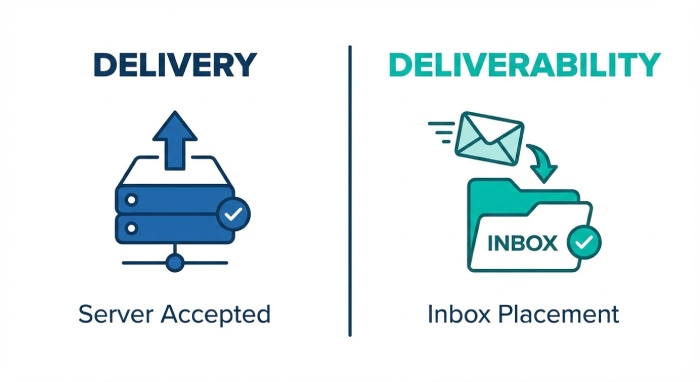
Deliverability vs. mere delivery
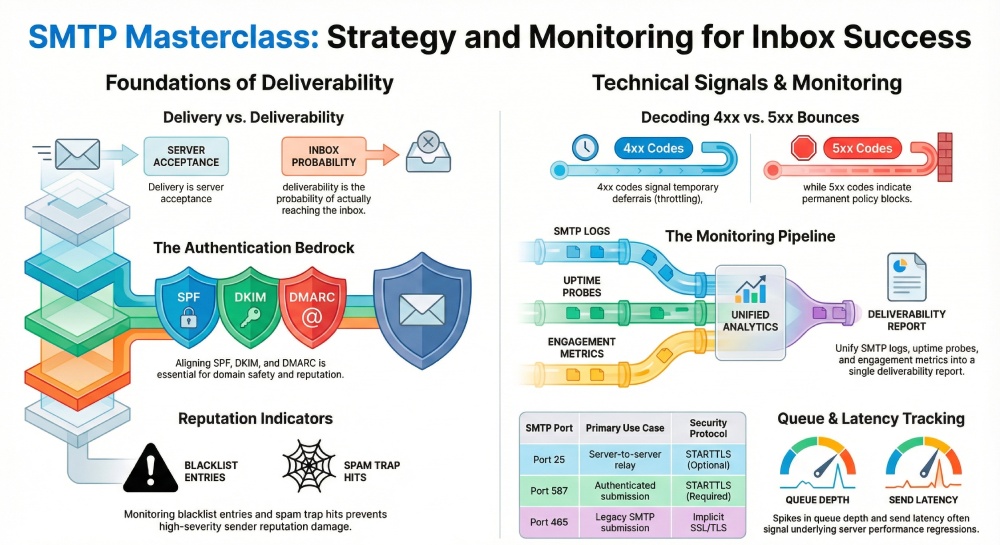
SMTP deliverability is the probability that a message accepted by a receiving system ultimately lands in the inbox rather than the spam folder or being silently discarded. Simple email delivery, by contrast, only asks whether a receiving mail server acknowledged the message. Effective smtp monitoring looks beyond acceptance to track inbox placement, routing, and degradation risks that influence overall email deliverability.
What smtp deliverability monitoring covers in practice
- End-to-end email monitoring across the smtp server, relay paths, and receiving domains
- Continuous checks on server uptime, smtp connectivity, and server availability
- Measurement of email delivery success, send latency, queue depth, and mail queue churn
- Authentication status (SPF, DKIM, DMARC), tls encryption policy, and smtp authentication outcomes
- Compliance with the smtp protocol (RFC 5321) and protocol commands during the smtp handshake
- Reputation indicators (blacklist reputation, email reputation, trap hits) summarized in a deliverability report
Because email transmission depends on more than a green “delivered” log line, your deliverability report should correlate server performance, authentication, and recipient engagement to flag systemic delivery issues before they impact business communication.
How SMTP decides deliverability: handshakes, routing, and decision points to observe
Handshakes, ports, and encryption
At the first decision point, the smtp protocol negotiates capabilities via ESMTP, then proceeds with the smtp handshake. Monitoring must validate:
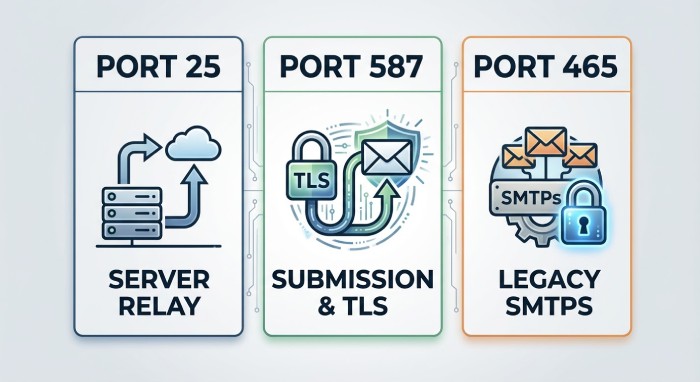
- The right smtp port is reachable (port 25 for server-to-server; port 587 for authenticated submission; port 465 for legacy SMTPS). Proactively test each smtp port because providers apply different filtering on port 25, port 587, and port 465.
- TLS and SSL behavior: STARTTLS (TLS) on port 25 and port 587, and implicit SSL/TLS on port 465. Log tls encryption and ssl encryption outcomes for transport layer security assurance.
- Correct smtp authentication flows on submission (AUTH on port 587), and esmtp extensions the peer advertises.
If an upstream firewall interferes, or STARTTLS breaks, smtp deliverability degrades even when email delivery superficially “works.” A robust deliverability report should explicitly record which smtp port was used, whether TLS was negotiated, and which cipher was applied.
Routing and MTA roles
After handshake, routing involves multiple Mail Transfer Agent (MTA) hops:
- originating smtp (submission MTA)
- relay smtp (intermediate MTA)
- delivery smtp (final handoff to the receiving domain)
- gateway smtp (security or compliance edge)
SMTP monitoring should tie delivery logs to each hop to spot server response time spikes and diagnostics indicating greylisting or throttling. Observing these decision points helps explain why one mail server pair succeeds while another stalls, even with identical content and email headers.
Queues, latency, and availability
Deliverability can suffer when the mail queue backs up. Monitor queue depth, send latency, and downtime detection events that correlate with degraded server performance. Uptime checks against each smtp server and MX host validate server uptime across regions and IP address pools. When alerts trigger, include incident comments and notification targets so operations and marketing see the same root cause, not just the symptom.
The signals that matter: bounces, deferrals, complaints, inbox placement, engagement, trap hits, blocklists
Hard/soft bounces and deferrals
Bounce monitoring must classify SMTP status codes and map them to delivery issues:
- 5xx hard bounces signal permanent problems (policy blocks, invalid users) that damage email reputation.
- 4xx deferrals indicate temporary conditions (rate limits, greylisting) and often reveal send latency or server availability problems.
Complaints, engagement, and inbox placement
ISPs weigh complaint rates, opens, clicks, and deletes as inbox placement signals. A comprehensive deliverability report should correlate engagement drops with changes in authentication, content, or server performance. Low engagement paired with rising deferrals often precedes spam-foldering.
Spam traps and blocklists
Trap hits and blacklist reputation events are high-severity. Monitor major DNSBLs and aggregate results. Automated alerting lets you quarantine problem traffic paths (e.g., a compromised relay smtp) to protect overall email health. Tighten phishing protection and email spam defenses at the gateway smtp without overblocking legitimate email transmission.
Authentication and reputation foundations: SPF, DKIM, DMARC, rDNS, TLS, IP/domain warm-up
Policy and cryptography
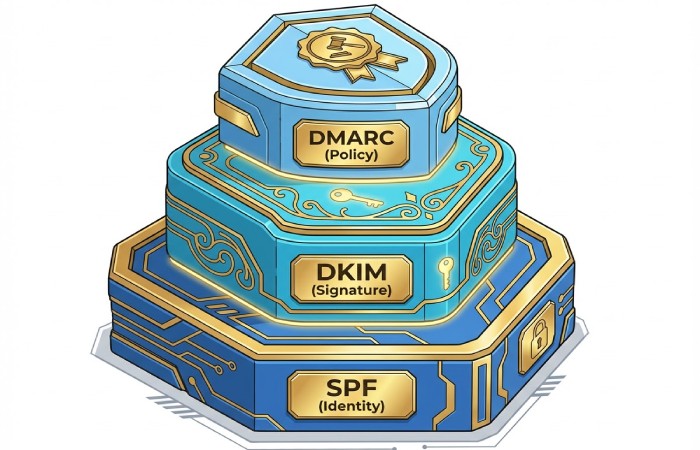
- SPF and spf records: Publish accurate sender policy framework entries for each sending IP address and subnet, aligned with the MX and A hosts expected to send. Tools that run MX Lookup and check SPF flattening help keep policies maintainable.
- DKIM: Sign messages with strong keys and consistent selector strategy; verify alignment in the deliverability report.
- DMARC: Enforce alignment (SPF/DKIM with From domain), move from none to quarantine/reject as your metrics stabilize.
- rDNS: Ensure reverse DNS matches your HELO/EHLO; mismatches trigger policy blocks.
Transport security and ports
Enforce TLS where possible. For submission, prefer port 587 with STARTTLS; for legacy clients, port 465 using implicit SMTPS; and for MTA-to-MTA, negotiate STARTTLS opportunistically on port 25. Monitor each smtp port for cipher changes and failures that could reduce smtp deliverability.
Reputation and warm-up
Warm up new domains and IPs gradually, staging volume increases while tracking email deliverability, complaint rates, and bounce codes. Maintain consistent server uptime, stable server performance, and authenticated flows to cultivate durable reputation. For program governance and stakeholder education, share a weekly deliverability report across teams focusing on email monitoring KPIs and authentication drift.
Where the data comes from: SMTP logs, ISP feedback loops, postmaster tools, seed lists, and blocklist monitors
Primary telemetry and logs
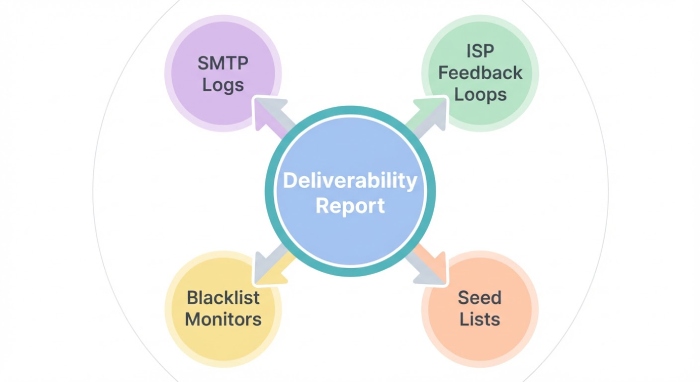
- SMTP logs and delivery logs: Parse protocol commands, connection outcomes, STARTTLS events, and MTA routing to build diagnostics. Include performance logs capturing server response time for each smtp server and peer.
- Seed lists: Test accounts across providers to estimate inbox vs. spam placement; compare with real-world signals.
- ISP feedback loops and postmaster consoles: Use Microsoft SNDS/DKIM insights, Gmail Postmaster, and Yahoo/AOL Delivery Center to track complaints, spam rate, and domain/IP reputation in your deliverability report.
External tools and services
- MxToolbox: Use SuperTool for MX Lookup, SPF, DKIM, and blacklists; test smtp connectivity on port 25, port 587, and port 465. For synthetics, send to ping@tools.mxtoolbox.com and monitor abuse@ mxtoolbox.com responses for policy guidance (use abuse@mxtoolbox.com where relevant).
- UptimeRobot: Configure uptime checks and downtime detection for every mail server and smtp port; visualize trends in the UptimeRobot Dashboard and set Slack notification via integration. When outages occur, add incident comments and route alerting to sub-user management groups across Ops and Marketing.
Operational instrumentation
- Monitor server uptime and server performance per IP address pool and datacenter.
- Correlate smtp monitoring with firewall changes, TLS policy shifts, and content updates.
- Automate remediation workflows: throttle or reroute through a healthier gateway smtp; isolate an originating smtp whose queue depth spikes; or temporarily pause a delivery smtp pool with rising blocklist hits.
Putting it together: monitoring that improves outcomes
A practical checklist for ongoing smtp monitoring
- Validate smtp protocol compliance and ESMTP features across all edges.
- Continuously test smtp connectivity and email delivery over port 25, port 587, and port 465; confirm tls encryption and ssl encryption negotiate as intended.
- Track mail queue, queue depth, send latency, and server response time to catch performance regressions early.
- Audit SPF, DKIM, and DMARC alignment; maintain spf records; verify rDNS; and document results in each deliverability report.
- Watch reputation: blacklist reputation, email reputation, complaints, trap hits.
- Instrument tools: MxToolbox SuperTool, MX Lookup, Delivery Center metrics, and UptimeRobot with Slack notification and clear integration ownership.
Why this matters
Organizations depend on reliable email delivery for business communication, invoicing, and customer lifecycle messaging. Without disciplined smtp monitoring tied to actionable metrics, subtle protocol errors, authentication drift, or degraded server performance can silently drain revenue. By unifying logs, reputation feeds, and postmaster data into a living deliverability report, teams preserve smtp deliverability and sustain long-term email deliverability gains across every smtp server in the fleet.
Building the monitoring pipeline: collection, normalization, dashboards, alerts, and thresholds

Data collection and normalization
A resilient smtp monitoring pipeline begins with comprehensive data capture from every smtp server in your fleet. Collect delivery logs, smtp handshake transcripts, protocol commands, and performance logs from your Mail Transfer Agent (MTA) nodes to track email transmission and send latency. Include bounce monitoring events, queue depth from each mail queue, server response time, and smtp connectivity probes from external vantage points to validate server availability and server uptime.
Sources, schema, and enrichment
Pull data via syslog, API exports, and agent-based collectors; enrich each record with IP address, hostname, smtp port (port 25, port 587, port 465), provider (gateway smtp vs originating smtp vs delivery smtp), and authentication state (smtp authentication, ESMTP/SMTPS). Normalize to a schema aligned with RFC 5321 fields (envelope, rcpt, reply code), and persist email headers, DKIM/DMARC/SPF evaluation, and diagnostics for downstream analysis. Use MxToolbox SuperTool, MX Lookup, and Delivery Center APIs to append blacklist reputation, DMARC policy, and email reputation attributes to support smtp deliverability insights.
Dashboards, alerts, and thresholds
Build Grafana/Looker dashboards that surface email deliverability KPIs alongside server performance and uptime checks. Trend bounces by 4xx/5xx code, map queue depth against send latency, and segment by smtp server, mail server cluster, and smtp protocol mode (ESMTP/SMTPS with TLS/SSL). Track smtp port health with separate tiles for port 25, port 587, and port 465 to immediately spot delivery issues tied to ISP blocks or firewall policy changes.
Alerting and escalation workflow
Define alerting thresholds for rising 4xx rates, greylisting spikes, throttling indicators, or downtime detection from external probes like UptimeRobot and the UptimeRobot Dashboard. Route notification messages to Slack with runbook links; capture incident comments and remediation outcomes in your ticketing system. For external checks, configure MxToolbox monitors (ping@tools.mxtoolbox.com) and abuse desk workflows (abuse@mxtoolbox.com) to escalate blacklist or abuse signals in near-real time; integrate these signals into your deliverability report stream for leadership visibility.
Reading SMTP responses and patterns: decoding 4xx/5xx codes, throttling, greylisting, content/reputation blocks
Decoding responses and throttling behaviors
Mastery of the smtp protocol is essential for precise smtp monitoring. Per RFC 5321, 2xx denotes success, 4xx temporary failures, and 5xx permanent failures. Patterns of 421/451 often reveal throttling or greylisting; 421 with enhanced status codes can signal rate limits, while 451 with policy text may imply transient content scanning. Consistent 550/554 often reflect policy blocks, authentication failures, or domain reputation issues, all of which degrade smtp deliverability and email deliverability.

Temporary vs. permanent failure patterns
Examine delivery logs for clusters of 421/451 after high-volume bursts; correlate with server performance and queue depth to distinguish provider throttling from internal congestion. Persistent 550 5.7.1 with “Message content rejected” implies content filtering, while 550 5.7.26 may indicate DMARC alignment failures impacting email delivery across major mailbox providers’ Delivery Center equivalents.
Content and reputation blocks
Blocks tied to blacklist reputation or malformed email headers require swift forensics. Review authentication results (spf records per Sender Policy Framework, DKIM signature status, and DMARC policy enforcement), and confirm transport layer security settings (tls encryption or ssl encryption for SMTPS on port 465). Validate that the firewall allows outbound ESMTP on port 587 for submission, and that the gateway smtp adheres to provider guidelines to maintain smtp deliverability.
Forensic workflow and tools
Correlate smtp connectivity tests from MxToolbox and UptimeRobot with spike periods; inspect email headers for provider-specific enhanced codes. Use Delivery Center-style dashboards to attribute delivery issues to content, reputation, or infrastructure. Where appropriate, coordinate with abuse desks using standardized evidence and your latest deliverability report to speed remediation.
Remediation and optimization playbook: list hygiene, cadence, segmentation, content, and infrastructure tuning
List hygiene, cadence, and segmentation
Strong list hygiene directly improves email deliverability. Suppress chronic non-openers, implement sunsetting, and run re-permissioning campaigns aligned to consent practices to protect email health. Segment by engagement, region, and mailbox provider to tune cadence and mitigate throttling, thereby improving server uptime stability for your smtp server estate during peaks.

Cadence and audience controls
Right-size sending windows to respect provider rate limits; stagger high-volume sends to reduce mail queue spikes and send latency. Segment by IP/domain (originating smtp pools) so that critical business communication traffic remains insulated from promotional surges, strengthening overall smtp deliverability.
Content and infrastructure tuning
Optimize content to reduce email spam risk: concise subject lines, clean HTML, and consistent branding. Technically, ensure spf records are accurate, DKIM keys rotate, and DMARC is at enforcement with alignment policies. Review TLS versions and cipher suites; confirm SMTPS on port 465 and authenticated ESMTP submission on port 587 are available where appropriate, while maintaining legacy relay smtp flows on port 25 for server-to-server email transmission.
Authentication, ports, and MTA efficiency
Tune Mail Transfer Agent concurrency, backoff, and retry timers; monitor smtp handshake timings and server response time. Rebalance queues by provider and prioritize transactional delivery smtp paths. Validate smtp authentication success rates and certificate freshness; continuously test smtp port reachability (port 25, port 587, port 465) as part of ongoing smtp monitoring to uphold server performance and reliable email delivery across every mail server.
Governance and risk: consent, legal regimes (CAN-SPAM/GDPR), DMARC alignment, BIMI, and security controls

Consent and regulatory requirements
Establish consent capture and evidence trails to satisfy CAN-SPAM and GDPR. Maintain clear unsubscribe pathways and honor preferences promptly to prevent complaints that damage email reputation and degrade email deliverability. Document data flows and retention for audits and to reinforce the credibility of each deliverability report shared with compliance.
DMARC alignment, BIMI, and policy hardening
Move to DMARC enforcement (p=quarantine or p=reject) with strict alignment to protect domains, and deploy BIMI once DMARC, DKIM, and SPF are stable. Enforce DNS hygiene, rotate keys, and validate ARC/forwarding scenarios to minimize false failures that can manifest as delivery issues and harm smtp deliverability.
Security controls and incident readiness
Harden perimeter and outbound policies: rate-limit anomalies, enforce tls encryption for opportunistic TLS, validate ssl encryption where legacy systems require it, and restrict relay smtp misuse. Invest in phishing protection, layered firewall rules, and continuous email security improvements to reduce compromise risk that would otherwise jeopardize server uptime and every smtp server’s reputation.
Incident handling and vendor coordination
Standardize runbooks for blacklist events, with prewritten incident comments, provider contacts, and test plans. Coordinate with mailbox providers’ postmaster tools and include MxToolbox and Delivery Center intelligence in your remediation package.
Proving value: KPIs, A/B tests, cohort analyses, ROI, and communicating insights to stakeholders
Measurement framework and tests
Define KPIs spanning smtp deliverability (accepted rate, 2xx), email deliverability (inbox rate proxies), and infrastructure (server uptime, server performance, smtp port availability). Run A/B tests on subject lines, authentication settings, and cadence; cohort analyses by acquisition source and mailbox provider reveal which segments lift email delivery outcomes.
ROI modeling and cohort attribution
Translate incremental opens, clicks, and conversions from improved smtp monitoring into revenue. Attribute reductions in queue depth, send latency, and downtime detection to avoided costs, and quantify reputation recovery cycles; present the findings in a recurring deliverability report.
Communicating insights
Package insights for executives with trend lines, root causes, and actions tied to business communication objectives. Automate distribution via Slack and email monitoring digests; use role-based access and sub-user management in your analytics stack to tailor integration views per team.
Reporting cadence and stakeholder alignment
Adopt a monthly deliverability report that combines qualitative learnings with quantitative metrics. Highlight smtp protocol issues, smtp server bottlenecks, and port 25/port 587/port 465 reachability to ensure technical and marketing teams jointly sustain high email delivery performance.
FAQs
What’s the difference between port 25, port 587, and port 465 for SMTP?
Port 25 is primarily for server-to-server relay and may be blocked by ISPs; port 587 is the submission port for authenticated clients using ESMTP. Port 465 is SMTPS, wrapping SMTP in SSL/TLS; monitor each smtp port separately to maintain smtp deliverability and email deliverability.
How do I know if throttling or greylisting is causing delivery issues?
Look for clusters of 421/451 responses in delivery logs with rising send latency and queue depth. If external probes show normal server uptime but your smtp server returns temporary errors, the pattern often indicates provider throttling rather than internal outages.
What should a good deliverability report include?
Include acceptance rates, 4xx/5xx trends, blacklist reputation status, authentication pass rates (SPF, DKIM, DMARC), smtp connectivity and smtp handshake metrics, and port 25/port 587/port 465 reachability. Add actions taken, incident comments, and ROI impact to connect smtp monitoring outcomes with business results.
Key Takeaways
- Build an end-to-end smtp monitoring pipeline that unifies logs, probes, and authentication results to safeguard email deliverability and server uptime.
- Track smtp port health across port 25, port 587, and port 465, and correlate 4xx/5xx patterns with queue depth and send latency to isolate delivery issues.
- Enforce SPF, DKIM, and DMARC, then optimize cadence, segmentation, and MTA settings to boost smtp deliverability and reliable email delivery.
- Use a recurring deliverability report to quantify ROI, document remediation, and align stakeholders across marketing, security, and operations.
- Harden transport layer security, firewall rules, and abuse workflows to protect every mail server and preserve server performance and reputation.