

Your website is the place prospects decide whether you feel credible, customers decide whether you feel current, and partners decide whether you feel easy to work with. If publishing a new page still requires a ticket, a developer handoff, and a quiet prayer that nothing breaks, your CMS is charging you interest every week.
Webflow makes business sense when you want to replace that interest with compounding returns: faster launches, tighter brand consistency, and a site your team can tune like a growth product.
Name The Real Problem: Legacy CMS Drag
Legacy CMS platforms rarely fail like an old elevator: still moving, but never quite on time, and always a little risky. The cost shows up as stalled campaigns, cautious editors, and a backlog that becomes your publishing calendar. When speed matters, “good enough” infrastructure becomes a competitive disadvantage.
Slow Publishing Turns Into Slow Revenue
Buyers who search today expect answers today, and paid traffic doesn’t wait for your release cycle. If your CMS makes every update feel like surgery, you’ll avoid the small fixes that usually move conversion rates.
Messaging gets stale because updating it feels expensive. Product pages drift from reality. And your best ideas die in draft because nobody wants to book “another website change.”
Plugin Pyramids Create Fragile Websites
Many legacy stacks survive on a tower of plugins, patches, and custom glue code. Each dependency introduces another update schedule, another security surface, and another opportunity for conflict.
If you’ve ever heard “don’t update that plugin during launch week,” you’re already living inside the constraint. Security updates become trade-offs instead of defaults. Performance fixes get postponed because they require risky refactors.
Collaboration Breaks Down Into Workarounds
When approvals and edits don’t fit the platform, teams invent their own systems: duplicate pages, copy-pasted modules, and “temporary” sections that never leave. That’s how inconsistent CTAs, outdated legal copy, and mismatched design patterns spread.
A CMS should reduce coordination overhead, not amplify it. If two people can’t safely work on the site without stepping on each other, your process will eventually become defensive. Defensive processes slow growth.
Choose Webflow When Marketing Speed Must Stay On Brand
Webflow is a strong replacement when your site needs to change as often as your messaging does. It gives you a visual workflow that still produces production-grade front-end output. The win is “no code” as a slogan – it’s fewer handoffs and fewer opportunities for errors. You move faster without letting the brand fragment.
Visual Building With Guardrails, Not Chaos
You can build and adjust layouts directly, then publish without waiting for the next sprint. That sounds obvious until you’ve lived the alternative. With roles, staging, and review, your team can ship quickly while keeping accountability clear.
Components And Design Systems Pay Off Fast
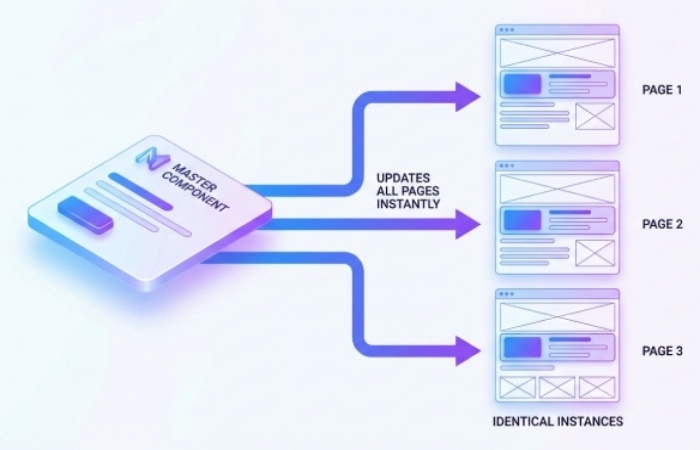
Webflow encourages reusable components and shared styles, which means you can scale output without scaling inconsistency. If you invest in a component library early, you’ll feel the payoff every time a campaign needs “just one more page.”
This is where Webflow earns its keep—it makes the “right way” the fast way. Instead of policing design through Slack comments, you encode it in components. The result is less debate, fewer mistakes, and cleaner onboarding for new teammates.
Structured Content Beats Template Sprawl
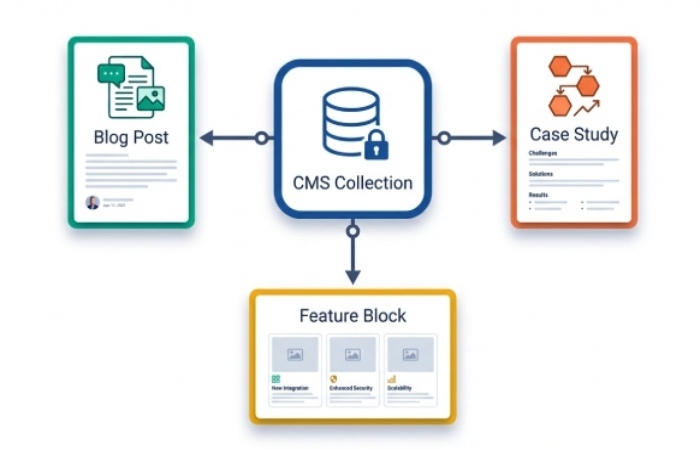
Modern marketing wants content that can be reused: a testimonial that appears across product pages, a pricing snippet that stays consistent, a feature block that updates once. Webflow’s CMS collections let you model that structure instead of cloning templates.
Build A Business Case That Finance Will Respect
A CMS migration is expensive when framed as a redesign. Still, it becomes rational when framed as an operating model change, comparing Webflow pricing plans against the blended cost of developer time, agency retainers, and maintenance.
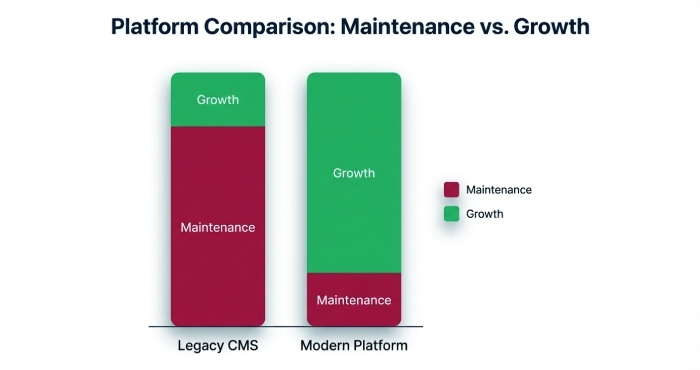
Webflow tends to win when developer time is scarce, agency support is expensive, or campaigns are frequent. The ROI shows up in speed, reduced maintenance, and better performance discipline.
Shift Budget From Maintenance To Outcomes
Security patching, plugin conflicts, hosting tuning, and emergency fixes eat up attention that could be spent on acquisition and retention. Webflow offloads much of the platform upkeep, so your spend can move toward experiments, content quality, and conversion work.
Faster Iteration Compounds, Quietly
Most meaningful growth comes from a hundred small improvements, not one heroic redesign. A clearer headline. A tighter form. Better internal linking. When publishing becomes routine, you can run these improvements continuously and let the gains stack.
This is the part executives underestimate: velocity is a strategy. A team that can ship five improvements per week will outrun a team that ships five per quarter, even if both teams are “smart.”
Governance And Auditability Now Matter More
Security teams increasingly ask for access controls, user activity visibility, and predictable change management. Webflow has been adding enterprise-ready governance features, including audit logging capabilities, which help reduce the friction between marketing speed and compliance expectations.
This is also where the conversation shifts from “marketing wants autonomy” to “the business wants reliability.” When your CMS can show who changed what and when, approvals become easier to grant. Trust becomes operational.
Just as SPF, DKIM, and DMARC protect your domain from spoofing, improve email deliverability, and strengthen overall email security, strong CMS governance protects your website from operational risk.
Migrate Without Sacrificing SEO Or Sanity
Migrations fail when teams treat them like page rebuilding exercises – they succeed when teams treat them like information architecture projects with strong QA. If organic traffic matters to you, you need a plan for URLs, metadata, internal links, and performance before you touch design polish.
Start With A URL Map And Redirect Plan
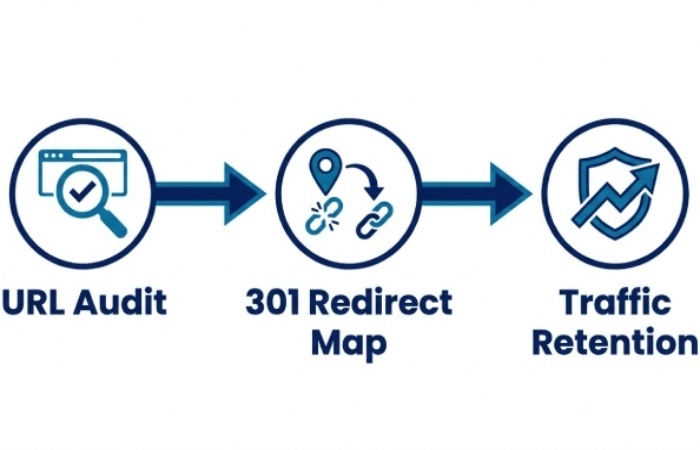
Export every indexable URL, then decide what stays, what consolidates, and what should be retired. Map each old URL to a new destination and implement 301 redirects so authority transfers cleanly. Preserve titles, headings, meta descriptions, and image alt text unless you have a clear reason to improve them.
Rebuild With Collections, Then Assemble With Components
Define collections for repeatable content—resources, case studies, locations, team members—then build pages that pull from those collections. You avoid manual updates and create a system that supports growth without page bloat.
A clean model also protects you from the next replatforming cycle. When content is structured, you can move it again if you ever need to. When content is trapped inside fragile templates, every migration becomes a rebuild.
Ship With Performance And Accessibility As Requirements
Core Web Vitals now emphasize responsiveness across interactions (INP), not just the first tap, which rewards sites that keep pages lean and scripts disciplined. Use migration to drop unused libraries, simplify tracking, and build accessible patterns that don’t require retrofits.
Know When Webflow Is The Wrong Tool
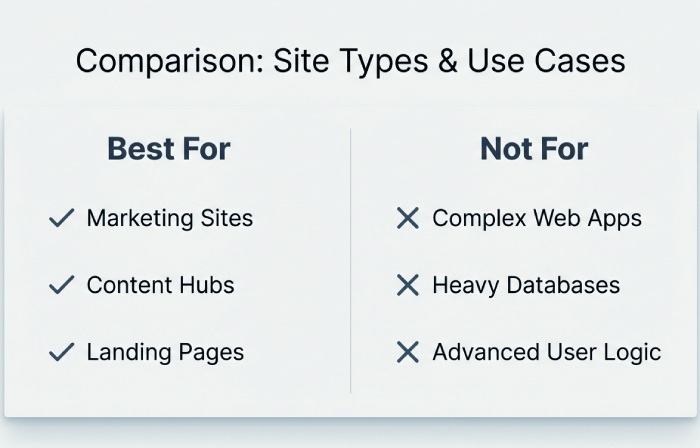
Webflow excels at marketing sites, content hubs, and conversion-focused experiences that benefit from tight design control and fast iteration. It is less suited to complex application backends, highly customized transactional systems, or extreme editorial scale.
Heavy Backend Logic Belongs Elsewhere
If your roadmap includes complex permissions, deep personalization based on proprietary data, or advanced workflows that behave like software, you’ll still need an application layer. Webflow can power the front door while your product runs on a dedicated backend. That split often improves reliability because each system stays in its lane.
Newsroom-Scale Publishing May Need Different Editorial Controls
If you publish thousands of items per day with multi-step approvals and strict editorial standards, specialized platforms can offer deeper workflow tooling. Webflow’s CMS is strong for structured content, but extreme volume can demand custom states, automation, and integrations built for media operations.
Regulated Industries Must Validate Governance Early
If you operate under strict compliance, don’t assume “modern” equals “approved.” Confirm requirements like SSO, role-based access, audit trails, and monitoring hooks before you commit to your timeline. When those boxes are checked, Webflow’s model can actually reduce risk by limiting plugin sprawl and keeping infrastructure updates centralized.
Conclusion
When publishing speed has an impact on revenue, trust, or the caliber of customer communications, it makes sense to replace a traditional CMS. When you want marketing control with safeguards, such as structured content, reusable components, and a workflow that incentivizes ongoing improvement, Webflow makes financial sense.
Without turning into surveillance tools, the finest websites are quick, reliable, localized, and quantifiable—they seem like live things. Because Webflow combines a visual workflow with more robust governance, contemporary performance standards, and AI support that may lessen busywork while maintaining editorial control, it aligns with that path.