

Email authentication plays a critical role in protecting your domain from spoofing and ensuring that your messages reach recipients’ inboxes. When DKIM signatures fail, it can lead to delivery issues, spam folder placement, or even rejected emails.
Using a DNS DKIM lookup and record inspector allows you to quickly verify your DKIM configuration, identify misconfigurations, and resolve signature problems. By analyzing your domain’s DKIM records and signature alignment, you can troubleshoot authentication failures and maintain secure, reliable email delivery.
Why DKIM signatures fail: symptoms, impact on deliverability, and how DKIM fits with SPF/DMARC

A failed DomainKeys Identified Mail signature usually surfaces in the email header under Authentication-Results as dkim=fail or permerror. Typical symptoms include the recipient server adding a warning banner, filtered inbound mail, or the message being quarantined due to broken email authentication. When a DKIM check fails repeatedly, the email sender risks degraded email deliverability and diminished sender reputation, especially for outgoing messages from a third-party provider.
Symptoms and impact visible in the email header
- Look for DKIM-Signature and Authentication-Results fields in the email header. A mismatch between the signing domain (d=) and the From domain name, a bad DKIM selector (s=), or a missing DNS record are common causes.
- Failure undermines message integrity and message authenticity, allowing phishing or spoofing attempts to slip through other defenses.
- Persistent failures harm campaign deliverability and may trigger aggressive filtering by large mailbox providers such as Google and Microsoft.
How DKIM fits with SPF/DMARC
DKIM is one pillar of the broader authentication framework. Alongside an SPF record and a DMARC record, DKIM proves that the email sender authorized the message. DMARC combines DKIM alignment and SPF check outcomes to instruct a recipient server on how to handle failures. Strong DKIM, SPF, and DMARC together bolster secure email, outbound email security, and overall email security.
DKIM fundamentals: selectors, keys, canonicalization, and how the signature is verified
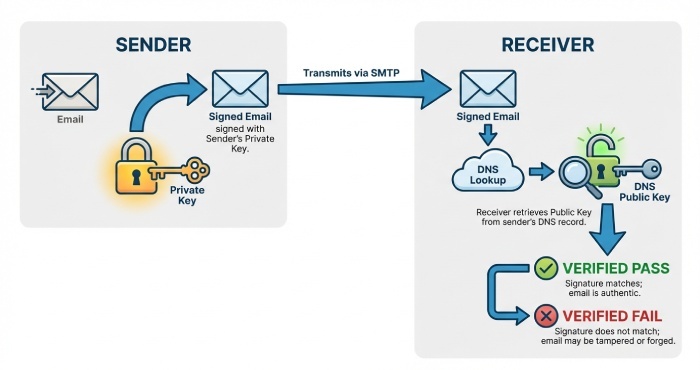
DomainKeys Identified Mail uses asymmetric cryptography to bind a digital signature to the message body and selected headers. The domain owner publishes a DKIM record as a DNS record, while the sending mail server applies a cryptographic signature with its private key.
Core components and verification flow
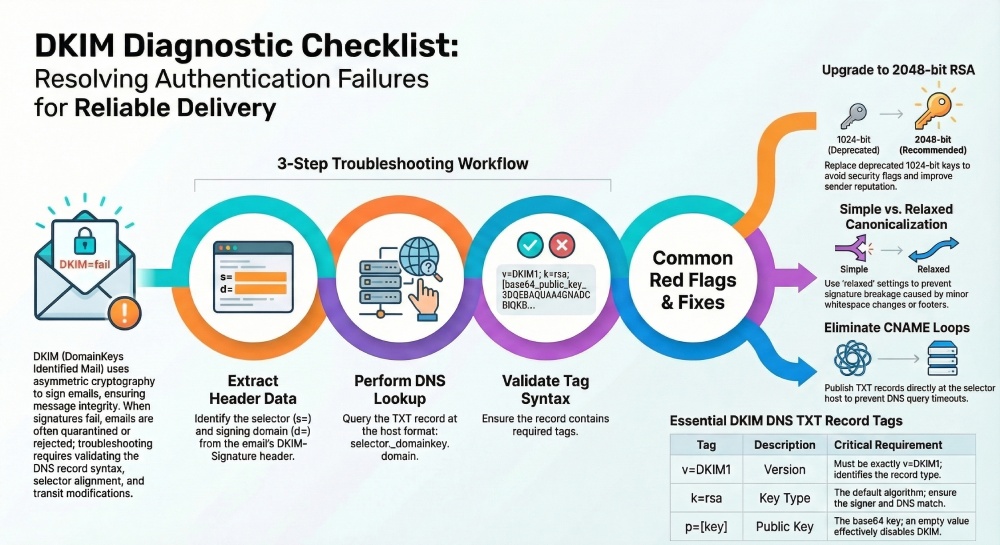
- Keys and tags: The DNS TXT record holds the DKIM key material, including v=DKIM1, k=rsa, and p= (public key). The public key is used by recipients to perform signature validation.
- Selector: A selector identifies which key to use. The DKIM selector appears in the DKIM-Signature header as s=. It maps to a host/name format of selector._domainkey.domain name.
- Verification: The recipient performs a DKIM lookup for the selector host, retrieves the TXT record, then uses RSA encryption with the published public key to check the digital signature. If the signed content matches, signature validation passes.
- Integrity: Because email in transit can be modified, canonicalization rules define how headers and body are normalized before verification to preserve email integrity.

Selectors, canonicalization, and host/name format
- Selectors allow key rotation without altering the primary signing domain. Example host: s1._domainkey.example.com.
- Canonicalization (simple/relaxed) controls how whitespace and line folding in the email header and body affect verification.
- The DNS record syntax must be precise: the TXT record containing v=DKIM1 and the long base64-encoded public key should not be split incorrectly or contain stray quotes.
What to collect before you start: headers, selector, sending domain, and toolset checklist
Effective troubleshooting starts with complete data. Collect these items before running a DKIM check or a DKIM record check:
- Full email header from the failing message, including DKIM-Signature and Authentication-Results.
- The DKIM selector (s=) and the signing domain (d=) from the header.
- The domain name that should host the DKIM record (the sending domain).
- The exact email sender system and path (e.g., SendGrid, Google Workspace, Microsoft 365), plus whether a third-party provider is responsible for mail signing practices.
- Access to the sending mail server or email server settings that control the private key and selector.
- Confirmation of the organization’s DMARC and SPF configuration.
Toolset checklist
- DNS query utilities (dig, nslookup) to perform a DKIM lookup against DNS.
- A DKIM record inspector, record checker, or record validator from vendors like EasyDMARC or MXToolbox to parse tags and run an automated DKIM record check and overall DKIM check.
- Administrative consoles for your platforms (Google Admin, Microsoft 365, SendGrid) and providers like DuoCircle.
- Security and compliance helpers: Domain Scanner, Phishing Link Checker, reputation monitoring dashboards, and an alert manager to track recurring failures.
- Broader ecosystem references: DMARC, SPF, BIMI, MTA-STS, and TLS-RPT (TLS reporting) for end-to-end visibility and email verification alignment. Many tools are profiled by Expert Insights, G2 Crowd, SourceForge, and Channel Program; operational teams sometimes integrate with systems like BetterTracker or EasySender for ticketing and reporting.
Running a DNS DKIM lookup: query syntax, locating selector records, and expected TXT-format results
A DKIM lookup retrieves the public key via DNS to enable signature validation. You’ll target the DKIM record’s selector host and verify the TXT record content.
Query syntax and locating selector records
- From the DKIM-Signature header, note s=selector and d=domain. Construct the host/name format: selector.domainkey.domain.
- Example: For s=s1 and d=example.com, query s1.domainkey.example.com.
- Use: dig +short TXT s1.domainkey.example.com or nslookup -type=TXT s1.domainkey.example.com.
- Ensure the domain name is correct and not rewritten by forwarding systems.
Interpreting expected TXT-format results
A proper TXT record for the DKIM record typically includes:
- v=DKIM1; k=rsa; p=MIIBIjANBgkqhkiG9w0BAQEFAAOCAQ8A…
- Optional tags may include t=y (testing). The p= value is the base64 public key that enables the recipient server to verify the digital signature.
- Beware of multiple TXT record strings; ensure the DNS record concatenation is correct and that the record syntax has no extraneous spaces or quotes.
Common pitfalls during a DKIM check
- Missing TXT record or stale CNAME chains.
- Wrong selector in the email header, or querying the wrong domain name.
- Key too short (e.g., 1024-bit) where policy requires 2048-bit RSA.
- Truncated p= value or line-wrapped values breaking DNS parsing.
Using a DKIM record inspector: parsing tags, validating key material, and spotting red flags
A DKIM record inspector accelerates troubleshooting by automating a DKIM record check and surfacing issues that cause failed signature validation. Most tools also cross-reference DMARC and SPF to contextualize overall email authentication health.
Parsing tags and validating key material
- Tags to verify: v=DKIM1, k=rsa, p= (public key). Confirm the p= base64 parses to a valid RSA key and that the key aligns with the expected DKIM selector.
- Validate key length and algorithm: Modern mail server policies favor 2048-bit RSA encryption; ensure the DNS record and the signer agree on k=rsa.
- Alignment: Check that the signing domain (d=) aligns with the visible From domain per DMARC, preserving message authenticity and supporting email verification across the authentication framework.
- Multiple checks: Run a DKIM check after any change, then confirm with a second DKIM record check from a different network to rule out cache or propagation issues.
Red flags that break signature validation
- Mismatched selector: The selector in the email header doesn’t exist as a DKIM record, or points to the wrong TXT record.
- Formatting errors: Extra semicolons, broken quoting, or split TXT records that garble the public key.
- Key rotation drift: The email sender switched keys, but the DNS record wasn’t updated; or the private key on the sending system doesn’t match the published public key.
- Provider mismatch: A third-party provider (e.g., SendGrid) is signing, but the domain owner published keys for a different selector.
- Policy conflicts: DMARC alignment fails even when the DKIM signature validates, still hurting email deliverability and sender reputation.
When to escalate or rotate keys
- If verification succeeds but intermittent failures persist, review canonicalization and header inclusion lists to protect message integrity.
- For repeated failures, rotate the DKIM key, update the DKIM record, and confirm propagation before resuming high-volume sends.
- Coordinate with your provider and security programs (BIMI, MTA-STS) to maintain a secure email posture, and ensure outbound email security and inbound mail handling are consistent across environments.
Practical workflow recap:
- Extract selector, domain name, and d= from the email header.
- Perform a DNS DKIM lookup for selector._domainkey.domain and verify the TXT record.
- Use a DKIM record inspector to run a DKIM check and deep DKIM record check.
- Validate the public key, confirm record syntax, and resolve any digital signature discrepancies.
- Re-test with real messages to confirm signature validation on the recipient server.
Reading the DKIM record correctly: v, k, p, t, s, h, n, and other tags—what they do and common gotchas
Core tags and record syntax
A DKIM record is a DNS record that publishes the public key and parameters used for DomainKeys Identified Mail. It lives as a TXT record at a selector._domainkey.domain name. Correct record syntax is essential for email authentication, because any parsing error can cause the digital signature on outgoing messages to fail signature validation at the recipient server.
v=DKIM1 and k=rsa
- v=DKIM1 declares the version. Omit other versions; use exactly v=DKIM1.
- k=rsa indicates the key type. RSA encryption remains the de facto standard; most email server software expects k=rsa. Avoid nonstandard key types unless both sides explicitly support them.
p= (public key) and key flags t=y/s
- p= publishes the base64-encoded public key that matches your private key in the signer. A missing or empty p= (public key) disables verification, breaking the DKIM check even if the email header has a signature.
- t= flags can mark a test mode (t=y) or restrict subdomain use (t=s). Leaving t=y in production can confuse record validator tools and reduce confidence in message authenticity during a DKIM record check.
Policy and selector mechanics
The selector identifies which key to use for signature validation. A DKIM selector is chosen by the domain owner or third-party provider and placed in the d= signing domain’s email header as s=selector. The selector plus the domain name form the host/name format of the DKIM record, enabling a DNS query to fetch the TXT record containing the public key.
s=, h=, n= notes and host/name format
- s= (not to be confused with the selector label) can limit which headers are signed but is rarely used; most implementations rely on h= to list header fields that are protected by the cryptographic signature.
- h= lists headers included in the signature; ensure From is included to maintain DMARC alignment and email integrity.
- n= is a note field; it’s informational only. Don’t put secrets here.
- Host/name format: selector.domainkey.domain name. For example, s1.domainkey.example.com points to a TXT record with the key material.
Example TXT record syntax
v=DKIM1; k=rsa; p=MIIBIjANBgkqhkiG9w0BAQEFAAOCAQ8A…; t=s; n=Key for marketing stream
Record checker cues
A record checker or record validator such as MXToolbox, EasyDMARC, or Google Admin Toolbox should report v=DKIM1, k=rsa, and a non-empty p= value. Use DKIM lookup utilities repeatedly after edits to catch quoting or whitespace mistakes before you run a full DKIM check on signed mail.
Frequent configuration errors and fixes: missing/invalid p=, quotes and line breaks, CNAMEs, and key size pitfalls
Missing/invalid p= and key-size pitfalls
A common failure is an empty p=, a miscopied public key, or a truncated base64 block in the DKIM record. Always paste the p= value without extra spaces or line breaks. For DKIM key size, 2048-bit RSA encryption is the baseline; 1024-bit keys may still verify but are deprecated and can hurt sender reputation and email deliverability.
1024 vs 2048 RSA encryption
- 1024-bit: Higher risk; some recipient server policies or security gateways flag them, impacting secure email goals.
- 2048-bit: Recommended balance of security and performance for email in transit. Some providers now support 3072-bit, but verify your mail server and third-party provider support to avoid DNS record bloat.

Quotes, line breaks, and CNAME missteps
DNS management UIs sometimes add quotes automatically around TXT record strings. Ensure the DKIM record appears as a single logical TXT record even if the UI splits it into multiple quoted chunks; the resolver will concatenate them. Avoid CNAMEs at the selector host; many verifiers expect the TXT record directly and a CNAME chain can lead to DNS query limits or timeouts. If you must use indirection, test with a DKIM record check and a DKIM lookup from multiple networks to ensure consistency.
Preventing CNAME loops and DNS query failures
- Do not point selector._domainkey to another CNAME that chains further; keep it at most one hop or publish the TXT record directly.
- Verify with MXToolbox, EasyDMARC, and a command-line dig to confirm the TXT record resolves quickly. A slow response contributes to intermittent DKIM check failures under load.
Tracing signature failures: bh vs b mismatches, header/body rewrites, mailing lists, and canonicalization issues
bh vs b mismatches and canonicalization
In a DKIM signature, bh= is the body hash and b= is the full digital signature over headers and the body hash. If bh mismatches, the body changes after signing (e.g., footers injected), breaking message integrity. If bh is fine but b fails, header rewrites alter a signed header. Choose relaxed/relaxed canonicalization to tolerate minor whitespace changes and reduce false failures in signature validation.
header/body rewrites, mailing lists, footers
Mailing lists often reformat subjects, add List-* headers, or append footers to the body. To maintain email authentication, sign with relaxed header canonicalization, include only stable headers in h=, and consider not signing subject for list-heavy traffic. Test how each email sender path treats the email header and body to predict where a DKIM check might fail.
Tools for DKIM check and DKIM lookup
- Run a DKIM lookup on the selector to ensure the DNS record is accessible and the TXT record reflects the expected public key.
- Send test messages through each path (Google Workspace, Microsoft 365, SendGrid) and inspect the Authentication-Results header for signature validation outcomes.
- Use EasyDMARC, MXToolbox, and DuoCircle dashboards to combine DKIM check, SPF check, and DMARC insights for faster troubleshooting.
Logs and message samples for signature validation
Collect raw RFC 822 samples with full email header data from the recipient server. Compare the d= signing domain, s= selector, and h= list with your DKIM record. Correlate failures across providers; if only one mailbox provider fails, investigate downstream header rewriting or transport gateways impacting message authenticity.

DNS and infrastructure nuances: propagation delays, TTLs, DNSSEC, split-horizon DNS, multi-ESP setups, and key rotation
Propagation delays, TTLs, DNSSEC, split-horizon DNS
- Propagation: After editing a DKIM record, allow TTL to expire before judging results. Shorten TTL temporarily during migrations.
- DNSSEC: Signing your zone enhances email security by protecting the TXT record from tampering. Confirm resolvers at large providers validate your chain.
- Split-horizon DNS: Ensure the same DKIM record is visible internally and externally; mismatches cause sporadic DKIM record check failures across networks.
Multi-ESP setups, selector strategy, key rotation
Use distinct selectors per stream or provider, e.g., s=corp for corporate mail and s=mktg for marketing. This clarifies which DKIM key signs which outgoing messages and eases key rotation.
Third-party provider coordination (SendGrid, Microsoft, Google)
When a third-party provider hosts the private key and performs mail signing practices, publish its matching public key in your DNS record. Coordinate rollover windows so the old and new TXT record values overlap while outbound email security switches to the new selector.
DKIM selector per stream, outbound email security
Segment by use case and lifetime. Short-lived campaigns can use ephemeral selectors for better reputation monitoring and faster revocation, improving campaign deliverability while preserving overall email integrity.
Validate and monitor: test sends, DMARC alignment checks, logs, automation, and ongoing maintenance playbook
Test methodology and DKIM record check
- Start with a DKIM record check and DKIM lookup to confirm v=DKIM1, k=rsa, and a valid p= (public key).
- Send to multiple destinations (inbound mail to Gmail/Google, Outlook/Microsoft, and independent mailboxes). Validate SPF record and DMARC record alignment alongside DKIM; the authentication framework works best as a trio (SPF, DKIM, DMARC).
- Inspect Authentication-Results for DKIM check status, DMARC alignment with the signing domain, and any ARC or MTA-STS policies affecting the path.
Mail server and recipient server perspectives
On the sending mail server, verify the DKIM key, private key permissions, and which headers are signed. On the recipient server, confirm the DNS query can fetch the TXT record swiftly and that signature validation passes with the expected selector and domain name.
Monitoring and alerting
Automate daily DKIM lookup and record validator runs to catch accidental edits. Use DMARC aggregate and forensic reports via EasyDMARC or similar, and add TLS reporting (TLS-RPT) plus MTA-STS to strengthen secure email posture. Layer in BIMI once DMARC enforcement is steady to reinforce brand trust and reduce phishing and spoofing risk.
Reputation monitoring and campaign deliverability metrics
Track sender reputation, bounce patterns, and complaint rates across providers. Review tools listed on G2 Crowd, SourceForge, and Expert Insights to select platforms that combine email verification, Domain Scanner, and Phishing Link Checker utilities. Some suites integrate alert manager features, BetterTracker analytics, and Channel Program listings; evaluate against needs for logs, API automation, and role-based access. If you rely on EasySender or similar ESPs, ensure they expose DKIM selector health, DKIM check results, and rotation status.
FAQs
What causes a DKIM signature to fail even when the DNS record looks correct?
Header or body changes after signing are the usual culprits. Mailing list footers, subject rewrites, or gateways that normalize whitespace can break the digital signature, leading to failed signature validation despite a correct DKIM record.
How often should I rotate DKIM keys and selectors?
Rotate at least annually, or more frequently for high-risk streams. Use separate selectors per stream so you can phase in new TXT record entries and retire old public keys without interrupting outgoing messages.
Is 2048-bit RSA required for DKIM?
It’s the current best practice for email security and widely supported. While 1024-bit may still verify, many organizations prefer 2048-bit for stronger message integrity and better sender reputation.
Can I use a CNAME for my DKIM record?
Avoid it when possible. Some verifiers follow CNAMEs, but chains and loops can cause DNS query timeouts; publishing the TXT record directly at selector._domainkey.domain name is more reliable.
How do DKIM, SPF, and DMARC work together?
SPF and DKIM provide authentication signals per message, while DMARC enforces policy and alignment with the From domain. Together they improve email deliverability, protect against phishing and spoofing, and support BIMI adoption.
Which tools can help me run a DKIM record check?
MXToolbox, EasyDMARC, and various provider consoles from Google, Microsoft, and SendGrid provide DKIM lookup and DKIM check features. Many platforms also validate v=DKIM1, k=rsa, and p= values and flag record syntax issues.
What should I monitor after deployment?
Track Authentication-Results, DMARC aggregate trends, and any DKIM check failures. Add TLS reporting and MTA-STS, and set alert manager thresholds for sudden changes in alignment or bounce spikes.
Key Takeaways
- Validate v=DKIM1, k=rsa, and a non-empty p= (public key) with a DKIM lookup and DKIM record check before sending live traffic.
- Use relaxed canonicalization, stable header sets, and distinct selectors per stream to prevent bh/b mismatches and ease key rotation.
- Publish TXT records directly at selector._domainkey.domain name and avoid CNAME chains to reduce DNS query failures.
- Monitor DMARC alignment, sender reputation, and campaign deliverability with tooling like MXToolbox and EasyDMARC, and automate alerts.
- Coordinate multi-ESP setups (Google, Microsoft, SendGrid) so the private key, public key, and DNS record updates are synchronized for reliable signature validation.