

What happens when your DKIM key is compromised? How can you identify and fix the problem?
As you might already know, DKIM protects your outgoing emails from being tampered with while they are on their way to the recipient’s inboxes. It does this by attaching a digital signature to your outgoing emails. When receiving servers get those emails, they verify that signature using the public key published in your DNS.
If the signature matches, it confirms that the message was not altered along the way and that it was signed by a server authorized to send emails for your domain. However, if the signatures do not match, the receiving server knows that something is wrong.
But where do these signatures come from in the first place?
They are created using your private DKIM key. This key stays on your mail server and is used to generate the digital signature attached to each outgoing email. The receiving server cannot see this private key; it only checks the signature against the matching public key stored in your DNS.
These keys are so critical to your DKIM setup that cybercriminals often try to steal or misuse them. That is why it is important to protect your DKIM private key from unauthorized access and rotate your DKIM keys regularly.
What are DKIM keys?
DKIM uses two keys: a public and a private key.
The public key, as the name suggests, is published in your DNS records and is referred to by the receiving server when your email reaches the recipient’s mailbox.
As for the private key, this stays securely on your mail server and is used to create the DKIM signature attached to each outgoing email.
So, every time an email goes out from your end, the mail server uses this private key to sign selected parts of the message, such as the sender details, subject line, and body content. The receiving server does not need to refer to your private key; it only needs the matching public key, published in your DNS. If the signature created by the private key matches the public key, the email passes DKIM. If it does not match, the email fails DKIM verification.
Since these keys verify the authenticity of your emails, they are the most important parts of your DKIM setup. If the private key is secure, only your authorized mail systems can send emails that pass DKIM checks for your domain. But if someone gets access to that key, they can create valid DKIM signatures for fake emails and make them look legitimate. This is why it is important to properly protect your DKIM keys, limit their access, and rotate them regularly to avoid misuse.
What happens if your DKIM key is compromised?
If an attacker gets hold of your DKIM key or gains access to the mail server where it is stored, they can do everything they need to send fraudulent emails from your domain, deceive your customers, and jeopardize your brand’s reputation.
Here’s what happens if your DKIM keys fall into the wrong hands:
Even fake emails can appear legitimate
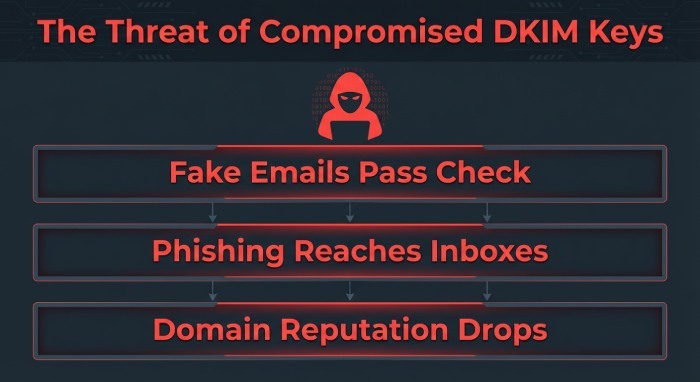
You might think your emails are safe, given that you have already enabled DMARC for your domain. But the reality is that if the attacker has your DKIM key, they don’t have to bypass DKIM anymore; they can simply make their fraudulent emails pass DKIM checks.
What’s worse is that in some cases, those emails might also pass DMARC. This is because DMARC only requires either SPF or DKIM to align with the visible “From” address. So if the attacker is using a valid DKIM signature from your domain, the receiving server may still treat the email as legitimate.
Phishing emails might easily reach your recipients
A DKIM key is a valuable asset for cybercriminals as it allows them to send phishing emails that appear to come from your domain. Since these emails come with a valid DKIM signature, they might not raise any red flags to the receiving server and may even pass DKIM checks successfully.
As a result, phishing emails, fake invoices, payment requests, or password reset emails may be much more likely to reach your customers’ inboxes.
Your domain reputation will be at stake
If the compromised key stays active for too long, it can start affecting your domain’s reputation.
Your customers might begin reporting suspicious emails. If such complaints become frequent and persistent, mailbox providers may start trusting your domain less. Over time, this can make it harder for your real emails to reach the inbox.
How can you tell if your DKIM key has been compromised?
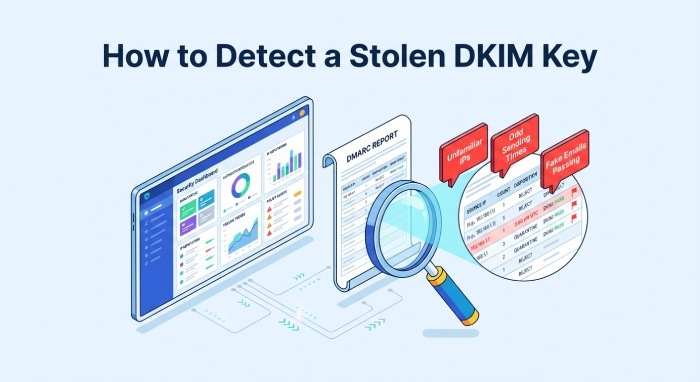
One of the clearest signs of a compromised DKIM key is unusual email activity from your domain. If your DKIM key is being misused, you might notice a sudden increase in unusual email activity from your domain, like emails being sent too often, at odd times, or emails coming from systems that should not normally be sending mail.
Your DMARC reports will reveal the real problem. If you see unfamiliar IP addresses, selectors, sending platforms, or locations in your reports, it may be a sign that someone is using your DKIM key outside your authorized mail systems.
If you notice suspicious emails passing DKIM checks, consider it a sign that an attacker has access to your DKIM key. Normally, phishing emails fail authentication checks because they do not have access to your private key. But if fake emails are showing “dkim=pass” in their headers, it may suggest that someone is signing them using your real DKIM key.
The next steps
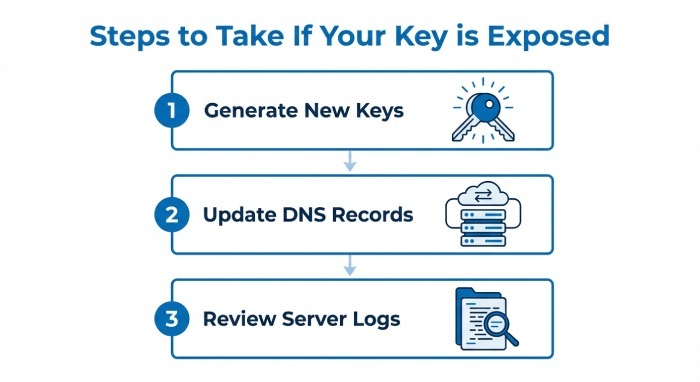
If you think that the DKIM key has been compromised, the first thing you should do is generate a new set of DKIM keys, both private and public, and update the new public key in your DNS. While you’re at it, make sure to update your mail servers and email providers to start signing emails with the new private key.
Do not remove the old key immediately; review your mail server logs, and audit any third-party email platforms connected to your domain.
To prevent this from happening again, rotate your DKIM keys regularly, use strong 2048-bit keys, and keep separate selectors for different email streams. It is recommended that you rotate your DKIM keys every 6–12 months, or immediately after a suspected breach.
If you need help configuring or maintaining DKIM for your domain, reach out to us at DuoCircle for expert support.