

SPF records updated by Google: Here’s what domain owners need to know!
Does your SPF record include Google as an authorized sender? If yes, then you must be dependent on Google’s recommended ‘include:_spf.google.com’ entry to make the most out of the SPF protocol. Recently, this entry has been updated by Google. So, if your domain has outdated or custom configurations, then the latest update may cause certain issues. This blog aims to explore the update in detail and the tactics that can be used to avoid any potential email deliverability hassles.
The connection between SPF and Google Workspace
SPF or Sender Policy Framework is a widely used, DNS-based email authentication protocol that informs a recipient server whether or not the sender is officially authorized to share emails from your business domain on your behalf. The SPF protocol relies on a DNS TXT record that lists all the authorized IP addresses.
With Google Workspace, it gets easier as it manages the SPF record in one space under “_spf.google.com.” This arrangement allows you to add all the Google mail server addresses by using the “include” value. The rest is handled by Google.
Suppose your emails are sent through Google Workspace only, then Google recommends using a simple SPF record: v=spf1 include:_spf.google.com ~all.
This SPF record clearly tells the recipient mail server that “Google is the only authorized sender for the domain. Anything else should be questioned or blocked.”

The new update
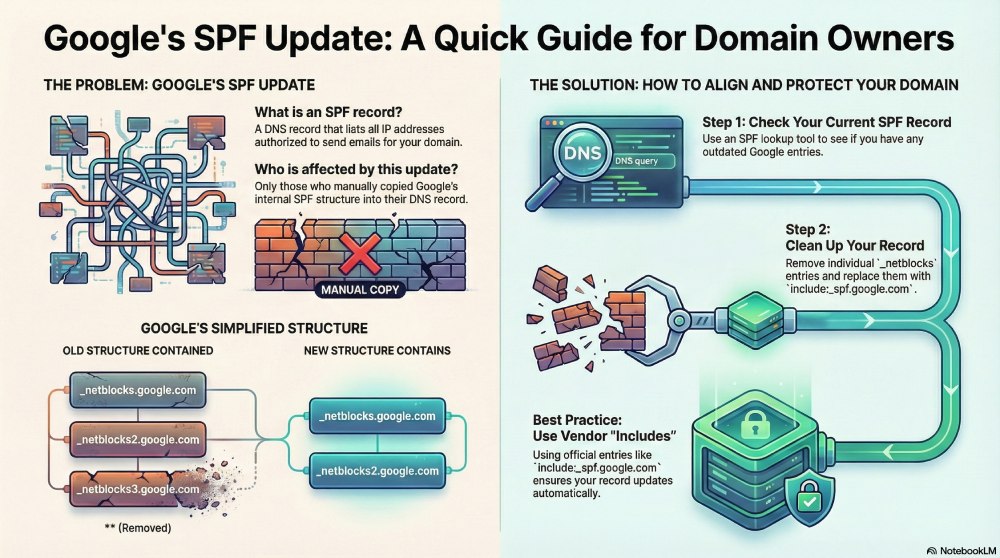
Earlier, the SPF record ‘_spf.google.com’ used to have three sub-records:
- _netblocks.google.com
- _netblocks2.google.com
- _netblocks3.google.com
The IP ranges that Google used to send emails were contained in the above-mentioned sub-records. The latest update involves Google removing _netblocks3.google.com. This clearly states that the third sub-record is no longer required.
Basically, Google is simplifying and decluttering the existing SPF setup.
Who will be affected by the latest update?
Those who have been using the Google Workspace’s recommended “include:_spf.google.com” entry will face no issue at all because of this update. However, those who manually copied Google’s internal structure may face problems. The SPF setup eventually gets messier and intricate. It is therefore important to remove all outdated references and keep your SPF clean, precise, and ready for any future updates from Google.

Is your domain affected? Here’s how to check!
Use an SPF lookup tool to run your current SPF record. The tool will help you find out if there are any unnecessary Google entries, such as _netblocks3.google.com. If there’s an outdated Google entry, your SPF record needs a thorough cleanup.
The SPF lookup tool you use must also highlight issues like broken includes or extra lookups. Go through them carefully to find out what you need to fix.
How to align your SPF record with Google’s latest update?
Once you know the issues, fixing them gets quite easy:
- Check if your SPF record consists “include:_spf.google.com.” If so, you do not need to change anything.
- In case there are individual netblock entries (_netblocks.google.com, _netblocks2.google.com, or _netblocks3.google.com), remove them immediately.
- You can replace all of them using a single “include.” This will keep your SPF configuration clutter-free.
- For detailed control, you need to remove _netblocks3.google.com. But in ideal cases. It is better not to split them.
When your SPF record is clutter-free, it minimizes the risk of errors, streamlines maintenance procedures, and makes future Google updates easier.

Top practices for SPF records
Below are the best practices to ensure that your email authentication system is clutter-free and simplified:
Do not manually expand SPF entries.
Avoid copying or rewriting internal SPF references. When you use hard-coding, it makes your SPF record messy and cluttered.
Go for vendor-issued “include” entries only.
Using official SPF “include” values backed by Microsoft or Google is a smart move. The tech giants automatically update everything for you.
Keep evaluating your SPF record on a regular basis.
Audit your SPF setup regularly to detect outdated entries, broken includes, or duplicated references to avoid alignment issues.
Boost SPF with DKIM and DMARC protocols.
Although SPF is popularly used for email authentication, you must combine it with DMARC and DKIM to boost the overall efficacy.
Make the most out of reporting or monitoring tools.
To further make the maintenance easier, you can also use tools like DMARC analyzers, SPF lookup, or email security dashboards. They enable you to track changes more effectively and identify any configuration issues ahead of time.
We understand if managing the technical SPF, DKIM, and DMARC records overwhelms you. We at DuoCircle can help you with everything related to email authentication. So contact us.